Tec
Diverse Infos zu Technik, ohne Bezug zu bestimmten Betriebssystemen
- Papierformate
- Tastaturbelegung
- Potensic Atom
- EU-Drohnenverordnung
- Docker
- Windstärken
- Mikrowelle
- Wie Ihre Fritteuse und andere Haushaltsgeräte zu Datensammler werden
- Jellyfin
- Mail smtp
- Wordpress
- Canon
- Formfaktor m.2
- SSD Total Bytes Written (TBW) Calculator
- What is Video Bandwidth ? 720p, 1080p, GB Transfer Explained
- SSD-Speicherstandards
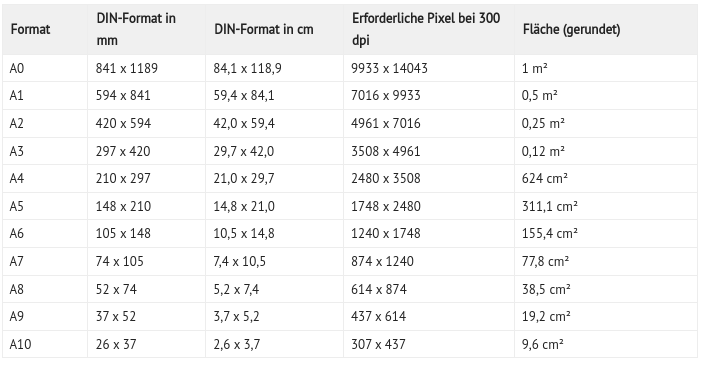
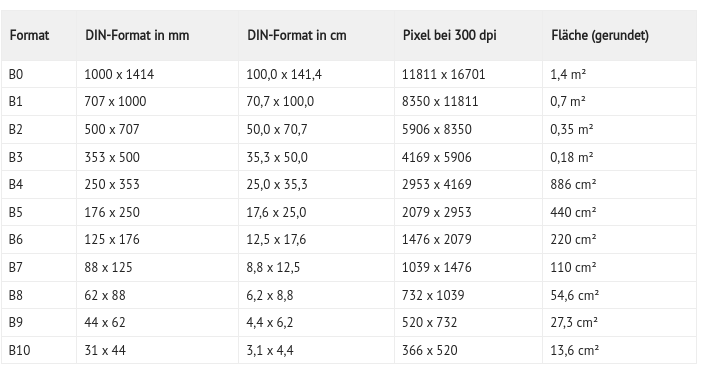
Papierformate
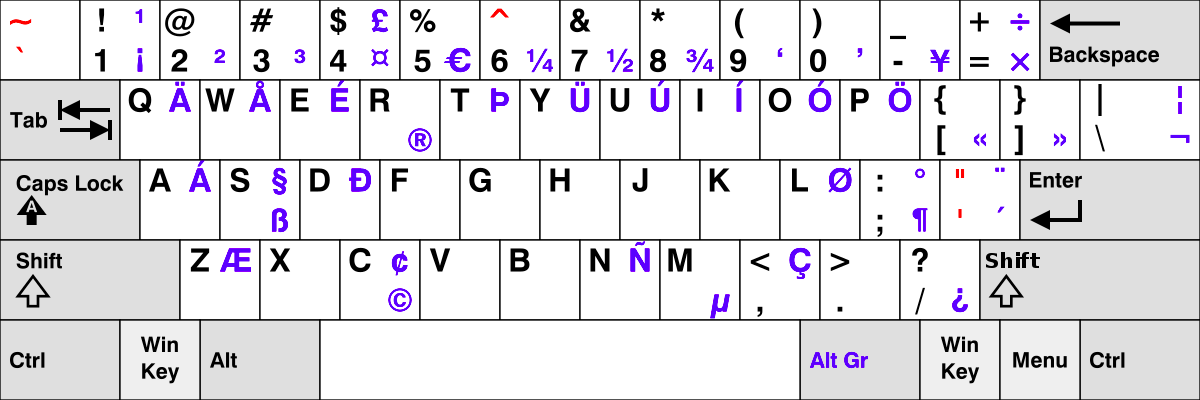
Tastaturbelegung
Potensic Atom
Aktuell nimmt der Wunsch nach kompakten, leistungsstarken und einfach zu bedienenden Fluggeräten stetig zu. Die Potensic Atom, ein neues Modell unter den Mini-Drohnen, verspricht genau das und noch viel mehr. Sie kombiniert fortschrittliche Technik mit einem benutzerfreundlichen Design und positioniert sich damit als ideales Werkzeug sowohl für Anfänger als auch für erfahrene Piloten. Dieser Testbericht bietet einen tiefen Einblick in die Funktionen, Leistung und das allgemeine Benutzererlebnis dieser beeindruckenden Mini-Drohne. Ob du ein begeisterter Drohnen-Enthusiast bist, der nach dem neuesten Modell sucht, oder jemand, der gerade erst in die Welt des Drohnenflugs einsteigt, dieser Bericht wird dir bestimmt dabei helfen, die Potensic Atom besser zu verstehen.
Testbericht zur Potensic Atom
Vorstellung der Potensic Atom Mini-Drohne
Die Potensic Atom-Drohne punktet mit ihrer Leichtigkeit und Handlichkeit. Trotz eines Gewichts von unter 250 Gramm bietet sie beeindruckende Technologien und Funktionalitäten. Sie verfügt über ein visuelles Positionierungssystem, das präzise Schwebeflüge sowohl innen als auch außen ermöglicht. Dank GPS-Technologie und automatischer Rückkehrfunktion bietet sie zusätzliche Sicherheit. Ihre Kamera, ausgestattet mit einem 1/3-Zoll-CMOS-Bildsensor von Sony, ermöglicht die Aufnahme von 4K-Videos mit bis zu 30 fps und 12-Megapixel-Fotos. Ein 3-Achsen-Gimbal sorgt für stabile Aufnahmen.
Die Fernsteuerung der Potensic Atom nutzt die digitale PixSync 3.0™-Übertragungstechnologie. Diese ermöglicht eine Kommunikationsreichweite von bis zu 6 Kilometern und eine hochauflösende Videoübertragung mit 720p. Die Fernsteuerung bietet eine integrierte Smartphone-Halterung. Über eine App können Nutzer ihre Drohne steuern und Videos übertragen. Die Steuerung verfügt über eine Lithium-Batterie mit einer Laufzeit von ca. 2,3 Stunden. Ergänzende technische Features beinhalten natürlich eine IMU, TOF-Sensoren, visuelle Positionierung, GPS, Kompass, Barometer und Joysticks für Schub-, Nick-, Roll- und Gier-Bewegungen für eine intuitive Bedienung.
Bedeutung von Mini-Drohnen im aktuellen Markt
In den letzten Jahren haben Mini-Drohnen erheblich an Popularität und Bedeutung im Drohnenmarkt gewonnen. Ihre kompakten Abmessungen und ihr geringes Gewicht machen sie zu idealen Begleitern für Hobbyfotografen, Reisende und Technikbegeisterte. Der Trend zeigt, dass Nutzer nach hochfunktionalen Geräten suchen, die dennoch leicht zu transportieren und einfach zu bedienen sind.
Genau hier setzt die Potensic Atom an. Sie kombiniert fortschrittliche Technologien, wie ihre 4K-Kamera und das GPS-gestützte Positionierungssystem, mit einer Portabilität, die ihresgleichen sucht. Im dicht gedrängten Markt der Mini-Drohnen hebt sich die Potensic Atom durch ihre beeindruckende Balance von Größe, Leistung und Preis ab. Es ist deutlich, dass solche Produkte wie die Atom-Drohne von Potensic den Bedarf der Verbraucher nach innovativen, handlichen und dennoch leistungsstarken Drohnen adressieren.
Spezifikationen und technische Daten
Wenn du in die Welt der Drohnen eintauchst, möchtest du sicherlich eine Drohne, die sowohl in technischer Hinsicht als auch in Sachen Handhabung überzeugt. Die Potensic Atom-Drohne bietet eine beeindruckende Liste von technischen Spezifikationen, die sie zu einer der besten Wahlmöglichkeiten in ihrer Kategorie machen.
Die Potensic Atom-Drohne hat ein Startgewicht von weniger als 249 Gramm. Dies beinhaltet das Gewicht des Akkus und der Propeller. Wenn Du die Abmessungen der Drohne betrachtest, wirst du feststellen, dass sie im gefalteten Zustand 88 x 143 x 58 Millimetern misst. Mit angebrachten Propellerblättern erweitern sich diese Maße auf 300 x 242 x 58 Millimetern, ohne sie sind es 210 x 152 x 58 Millimeter. Ein weiteres bemerkenswertes Merkmal ist der Abstand der Diagonalachse, der 219 Millimeter beträgt.
In Bezug auf die Geschwindigkeit kann die Potensic Atom-Drohne im Sportmodus eine beeindruckende maximale Fluggeschwindigkeit von 5 m/s beim Aufstieg, 4 m/s beim Abstieg und 16 m/s in horizontaler Richtung erreichen. Wenn du in extremen Wetterbedingungen fliegen möchtest, beachte bitte, dass die Betriebsumgebungstemperatur zwischen 0°C und 40°C liegen sollte. Die Drohne kann Windgeschwindigkeiten der Stufe 5 widerstehen und hat eine maximale Flughöhe von 120 Metern.
Die GNSS-Konfiguration der Potensic Atom-Drohne umfasst GPS, GLONASS, Galileo und BeiDou. Für den Betrieb nutzt sie Frequenzen zwischen 2,400 und 2,4835 GHz. Die Sendeleistung bei 2,4 GHz liegt bei weniger als 24 dBm. Die Genauigkeit im Schwebeflug ist sowohl im vertikalen als auch im horizontalen Modus beachtlich, wobei die vertikale Genauigkeit bei ±0,1 m für die visuelle Positionierung und ±0,5 m für die GPS-Positionierung liegt. Horizontal bietet sie eine Genauigkeit von ±0,3 m (visuell) und ±1,5 m (GPS).
Ein weiterer Vorteil der Potensic Atom-Drohne ist ihre beeindruckende maximale Flugzeit von 32 Minuten. Dies wurde unter Bedingungen gemessen, bei denen die Drohne in einem windstillen Zustand flog und sich mit einer konstanten Geschwindigkeit von 5 m/s bewegte. Beachte jedoch, dass zusätzliche Belastbarkeiten, wie das Anbringen von externem Zubehör, von dieser Drohne nicht unterstützt werden. Zusammengefasst bietet die Potensic Atom-Drohne eine beeindruckende Kombination aus technischen Spezifikationen und Funktionen, die sowohl für Anfänger als auch für erfahrene Drohnenpiloten geeignet sind. Es ist wichtig, sich immer über die technischen Daten und Fähigkeiten Deiner Drohne im Klaren zu sein, damit du sicher und effizient fliegen kannst.
Übersicht über das Design der Drohne
Die Potensic Atom zeichnet sich durch ein modernes und durchdachtes Design aus, das Funktionalität und Ästhetik vereint. Die ersten Eindrücke und Bilder offenbaren eine Drohne, die sowohl robust als auch kompakt konstruiert ist.
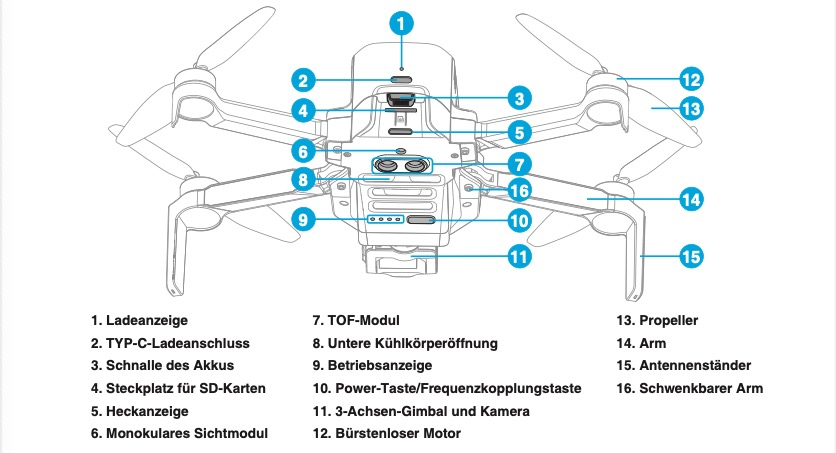
- An der Vorderseite fällt sofort die Ladeanzeige ins Auge, die zusammen mit dem USB-TYP-C-Ladeanschluss auf die moderne Technologie hinweist, die in dieser Drohne steckt.
- Der integrierte Steckplatz für SD-Karten erlaubt es, große Mengen an hochauflösenden Fotos und Videos zu speichern.
- Technische Features wie das TOF-Modul und die untere Kühlkörperöffnung sind Indikatoren für die fortschrittliche Technik, die in der Potensic Atom zum Einsatz kommt.
- Die Propeller sind so konstruiert, dass sie einen effizienten und stabilen Flug garantieren, unterstützt durch die faltbaren Ausleger und die stabilen Landebeine.
- Ein besonderes Highlight stellt der 3-Achsen-Gimbal mit Kamera dar. Dieser ermöglicht gestochen scharfe Aufnahmen, selbst bei bewegten Flugmanövern.
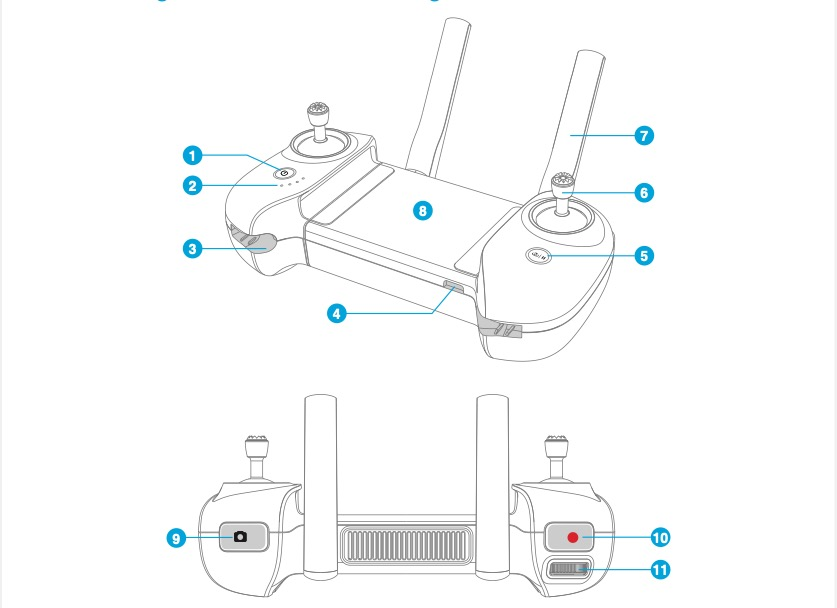
Übersicht über das Design der Fernsteuerung
Die Fernsteuerung der Potensic Atom vermittelt direkt einen Eindruck von Robustheit und Professionalität.
- Der Controller weist eine solide Bauweise auf und liegt dank ergonomisch geformtem Gehäuse gut in der Hand.
- Eine zentrale Power-Taste ermöglicht das einfache Ein- und Ausschalten des Geräts.
- Die Betriebsanzeige informiert über den Batteriestatus oder andere relevante Informationen des Controllers.
- Für eine effiziente Bedienung sind Steuerknüppel vorhanden, die in eigens dafür vorgesehenen Steckplätzen aufbewahrt werden können.
- Ein besonderes Highlight stellt die USB-Typ-C-Schnittstelle dar, die nicht nur das Laden des Controllers, sondern auch das Anschließen von Mobilgeräten ermöglicht.
- Für zusätzliche Funktionen sind die RTH/Pause-Taste, die Fototaste und die Videoaufnahmetaste integriert.
- Die faltbare Doppelantenne verbessert die Signalstärke und Signalqualität.
- Ein Gimbal-Einstellrad erlaubt eine präzise Steuerung der Kamera-Neigung.
Potensic Atom: Drohne und Fernsteuerung vorbereiten
Wenn du stolzer Besitzer einer Potensic Atom Drohne geworden bist, dann wirst du von ihrer Benutzerfreundlichkeit und Effizienz beeindruckt sein. Um die optimale Leistung deiner Drohne zu gewährleisten, solltest du jedoch einige grundlegende Vorbereitungsschritte befolgen.
Vorbereitung der Potensic Atom-Drohne:
Die Potensic Atom Drohne kommt im Lagerzustand direkt ab Werk. Befolge die folgenden Schritte, um deine Drohne einsatzbereit zu machen:
- Gimbal-Schutz entfernen: Dies ist der erste und wichtigste Schritt. Der Gimbal-Schutz schützt den Gimbal während des Transports. Entferne ihn bitte, bevor du die Drohne in Betrieb nimmst.
- Vorderarm öffnen: Klappe den Vorderarm der Drohne vorsichtig aus, um sie flugbereit zu machen.
- Hinteren Arm öffnen und Propellerblätter erweitern: Dies stellt sicher, dass die Drohne den nötigen Schub und die Stabilität für den Flug erhält.
Vorbereitung der Fernsteuerung:
Die Potensic Atom-Drohne wird über eine spezielle Fernsteuerung gesteuert, die auch Platz für ein Smartphone samt Live-Video-Feed bietet. Befolge diese Schritte, um die Fernsteuerung vorzubereiten:
- Antenne ausklappen: Stelle sicher, dass die Antennen vollständig ausgeklappt sind, um die beste Signalqualität zu gewährleisten.
- Handy mit USB-Kabel verbinden: Nutze das mitgelieferte Kabel, um dein Smartphone mit der Fernsteuerung zu verbinden.
- USB-Kabel in den Schlitz der Fernsteuerung schieben: Dadurch bleibt das Kabel während des Fluges fest an seinem Platz.
- Fernsteuerung erweitern: Ziehe die Fernsteuerung auseinander, um dein Smartphone sicher darin zu befestigen.
- Das andere Ende des Datenkabels in die Fernsteuerung stecken: So wird eine reibungslose Datenübertragung zwischen deinem Smartphone und der Fernsteuerung ermöglicht.
- Steuerknüppel entfernen: Nimm den Steuerknüppel von der Fernsteuerung ab.
- Steuerknüppel im Uhrzeigersinn einschrauben: Drehe den Steuerknüppel im Uhrzeigersinn, bis er fest sitzt.
- Installation abschließen: Jetzt ist deine Fernsteuerung bereit für den Einsatz!
Mit diesen einfachen Schritten sind sowohl deine Drohne als auch deine Fernsteuerung bereit für das ultimative Flugerlebnis. Es wird empfohlen, diese Schritte jedes Mal zu befolgen, wenn du deine Drohne fliegen möchtest, um sicherzustellen, dass alles reibungslos funktioniert.
Potensic Atom SE: Aufladen sowie Ein- und Ausschalten
Das richtige Aufladen und Ein- und Ausschalten der Potensic Atom-Drohne
Ehe du dich auf dein erstes Flugabenteuer mit der Potensic Atom begibst, gibt es einige wichtige Schritte, die du beachten solltest, insbesondere wenn es um das Aufladen und Ein- bzw. Ausschalten geht.
Aufladen des Akkus vor dem ersten Flug: Es ist essentiell, den Akku vor dem ersten Flug vollständig aufzuladen. Andernfalls wird er nicht ordnungsgemäß funktionieren. Hierzu schließt du den USB-TYP-C-Ladeanschluss des Akkus einfach an das USB-Ladegerät und das Stromnetz an. Es ist zu beachten, dass das USB-Ladegerät nicht im Lieferumfang des Produkts enthalten ist, daher musst du ein Ladegerät verwenden, das den FCC/CE-Spezifikationen entspricht. Während des Ladevorgangs leuchtet die rote Ladeanzeige. Sobald der Ladevorgang abgeschlossen ist, erlischt diese automatisch. Falls du das Fly More Combo-Paket erworben hast, kannst du den Akku auch mithilfe des Lademanagers bzw. Mehrfach-Ladegeräts aufladen. Mehr dazu findest du im Benutzerhandbuch des Mehrfach-Ladegeräts. Ein zusätzlicher Bonus ist, dass der Lade-Hub auch zum Aufladen der Fernsteuerung genutzt werden kann.
Zwei Methoden zum Aufladen
-
Methode 1: Hier wird der Akku direkt in der Drohne geladen. Dies ist ideal, wenn du nur einen Akku hast und die Drohne bereit halten möchtest.
-
Methode 2: Bei dieser Methode wird der Akku aus der Drohne herausgenommen und in ein externes Ladegerät eingesteckt. Diese Methode ist besonders nützlich, wenn du mehrere Akkus hast und sie gleichzeitig aufladen möchtest.
Zusätzliche Tipps
- Die Mindest-Ladezeit über den USB-TYP-C-Schnittstellenanschluss beträgt ca. 1 Stunde und 25 Minuten. Stelle sicher, dass dein Ladegerät einen 5V-3A-Ausgang unterstützt, um diese Ladezeit zu erreichen.
- Es wird empfohlen, die Batterien zum Laden aus der Drohne zu entfernen. Wenn du dies nicht machst und die Drohne während des Ladens eingeschaltet bleibt, schaltet sie sich automatisch aus, sobald die Batterien vollständig geladen sind.
- Beachte, dass der Akku nach Gebrauch heiß werden kann. Es ist ratsam, ihn vor dem Aufladen abkühlen zu lassen.
- Verwende immer das Originalkabel oder ein Kabel, das mehr als 3A Stromstärke unterstützt, um sicherzustellen, dass der Akku effizient aufgeladen und nicht beschädigt wird.
Mit diesen einfachen, aber wichtigen Hinweisen und Tipps bist du bestens darauf vorbereitet, deine Potensic Atom effizient und sicher aufzuladen und zu verwenden. Gute Flüge!
Anleitung: Einschalten und Ausschalten deiner Drohne und Fernsteuerung
Das richtige Einschalten und Ausschalten deiner Drohne und der dazugehörigen Fernsteuerung ist ein entscheidender Schritt, um sicherzustellen, dass beide Geräte effizient und ohne Probleme funktionieren. Hier ist eine schrittweise Anleitung, die dir hilft, den Prozess reibungslos und einfach zu gestalten.
Einschalten:
-
Drohne:
- Batterie-Check: Bevor du beginnst, stelle sicher, dass die Batterie korrekt im Batteriefach der Potensic Atom positioniert ist. Dies ist ein wesentlicher Schritt, um einen stabilen Betrieb zu gewährleisten.
- Einschaltvorgang: Halte die Power-Taste der Potensic Atom gedrückt, bis die Betriebsanzeige aufleuchtet. Sobald sie aufleuchtet, kannst du die Taste loslassen und der Einschaltvorgang ist abgeschlossen.
-
Fernsteuerung:
- Einschaltvorgang: Um die Fernsteuerung einzuschalten, drücke die Power-Taste und halte sie gedrückt, bis die Betriebsanzeige leuchtet. Lasse dann die Taste los, und die Fernsteuerung wird aktiviert.
Ausschalten:
-
Drohne:
- Ausschaltvorgang: Um die Drohne auszuschalten, drücke die Power-Taste kurz und halte sie dann weiterhin gedrückt, bis die Betriebsanzeige erlischt. Dies signalisiert, dass die Drohne vollständig ausgeschaltet ist.
-
Fernsteuerung:
- Ausschaltvorgang: Bei der Fernsteuerung hältst du einfach die Power-Taste gedrückt, bis die Betriebsanzeige erlischt. Danach kannst du die Taste loslassen und die Fernsteuerung ist ausgeschaltet.
Mit diesen klaren und einfachen Schritten kannst du sicherstellen, dass sowohl deine Drohne als auch die Fernsteuerung jedes Mal korrekt ein- und ausgeschaltet werden, wodurch ihre Lebensdauer verlängert und ein sicherer Betrieb gewährleistet wird. Achte immer darauf, diese Schritte genau zu befolgen, um mögliche Schäden oder Fehlfunktionen zu vermeiden.
Hochwertige Positionierung dank GPS und Sichtsensoren
Die Potensic Atom-Drohne ist ein hochmodernes Fluggerät, ausgestattet mit einem Flugsteuerungssystem, einem Kommunikationssystem, einem Positionierungssystem, einem Energiesystem und einer intelligenten Flugbatterie bzw. Flugakku. Jede dieser Komponenten trägt dazu bei, dass du ein einmaliges Flugerlebnis mit dieser Drohne genießt. Im Folgenden erfährst du mehr über die beeindruckenden Funktionen der Potensic Atom-Drohne:
Positionierung der Potensic Atom-Drohne
-
SurgeFly™-Technologie: Die Potensic Atom-Drohne nutzt die neueste SurgeFly™-Flugsteuerungstechnologie, die ein nahtloses Flugerlebnis bietet.
- GPS-Positionierung: Mit dem GPS-Modul der Potensic Atom-Drohne kannst du präzise Schwebeflüge, intelligente Flugrouten und automatische Rückkehrfunktionen nutzen. Das bedeutet, dass die Drohne immer genau dort fliegt, wo du es möchtest.
- Visuelle Positionierung: Falls du in Gebieten fliegst, in denen kein GPS verfügbar ist, wie z.B. in geschlossenen Räumen, kommt die visuelle Positionierung ins Spiel. Durch das nach unten gerichtete Sichtsystem erreicht die Potensic Atom-Drohne eine hohe Positionierungsgenauigkeit, selbst ohne GPS-Signal.
- Automatische Anpassung: Je nach Umgebung passt sich das Flugsteuerungssystem der Potensic Atom-Drohne automatisch an. Sollte weder das GPS noch das abwärts gerichtete Sichtsystem funktionieren, wechselt die Drohne in den ATTI-Modus. In diesem Modus musst du manuell steuern und Korrekturen vornehmen, da die Drohne nicht stabil schweben kann. Aber keine Sorge, mit ein wenig Übung wirst du auch diesen Modus meistern!
- Vorsicht im OPTI-Modus: Wenn du die visuelle Positionierung (OPTI-Modus) der Potensic Atom-Drohne nutzt, sollte dir bewusst sein, dass die Flugdistanz begrenzt ist. Bei einem verlorenen GPS-Signal oder fehlenden GPS kann die Drohne nicht zu einem bestimmten Punkt zurückkehren.
-
Sicherheit im ATTI-Modus: Wenn du mit der Potensic Atom-Drohne im ATTI-Modus fliegst, sei vorsichtig. Dieser Modus kann schwieriger zu steuern sein, und es besteht das Risiko, dass die Drohne ihre Lage- und Richtungseinschätzung verliert.
Sichtsensoren und Sichtsystem der Potensic Atom
Die Potensic Atom-Drohne verfügt über ein fortschrittliches abwärts gerichtetes Sichtsystem, welches ihre Leistung und Präzision erheblich steigert. Dieses System ist nicht nur innovativ, sondern auch für bestimmte Flugszenarien unerlässlich. Hier ist, was du darüber wissen musst:
Grundkomponenten des Systems
Das abwärts gerichtete Sichtsystem befindet sich an der Unterseite der Drohne und kombiniert eine monokulare Kamera mit einem TOF-Modul. Während die Kamera visuelle Daten liefert, misst das TOF-Modul (Time of Flight) die Zeit, die das Infrarotsignal benötigt, um vom Objekt zurück zur Potensic Atom zu gelangen. Diese beiden Komponenten arbeiten Hand in Hand, um die genaue Position der Potensic Atom in Echtzeit zu berechnen.
Funktionsweise und Anwendungen
Die Drohne kann mit diesem System in einem Höhenbereich von 0,3 bis 10 Metern arbeiten. Eine präzise Positionierung ist insbesondere in einem Bereich von 0,3 bis 5 Metern möglich. Dieses Sichtsystem eignet sich besonders für Szenarien, in denen kein GPS verfügbar ist. Selbst wenn kein GPS-Signal vorhanden ist, aber die Umgebung ausreichend strukturiert ist, kann die Potensic Atom dank dieses Systems ihre Position bis zu einer Höhe von 0,3 bis 5 m genau bestimmen.
Limitierungen und Vorsichtsmaßnahmen
Während das abwärts gerichtete Sichtsystem eine beeindruckende Technologie darstellt, gibt es bestimmte Szenarien, in denen es möglicherweise nicht optimal funktioniert. Daher sollte man aufpassen, wo man die Potensic Atom startet oder landen lässt. Folgende Oberflächen könnten dazu führen, dass die Potensic Atom bzw. die Sichtsensoren der Potensic Atom nicht richtig funktionieren:
Es ist wichtig zu beachten, dass die visuelle Positionierung lediglich als Hilfsmittel für den Flug dient. Es liegt in der Verantwortung des Benutzers, immer die Flugumgebung und die Änderungen des Positionierungsmodus zu überwachen. Die manuelle Steuerung bleibt essentiell und du solltest jederzeit bereit sein, die Kontrolle über die Drohne zu übernehmen.
Status-LEDs der Potensic Atom-Drohne
Die Potensic Atom-Drohne verwendet ein System von Status-LEDs, um den aktuellen Betriebszustand und mögliche Warnungen oder Anomalien anzuzeigen. Dies ist besonders wichtig, um sicherzustellen, dass die Drohne korrekt funktioniert und sicher fliegt. In diesem Leitfaden werden wir die verschiedenen LED-Anzeigen und ihre Bedeutungen detailliert erläutern.
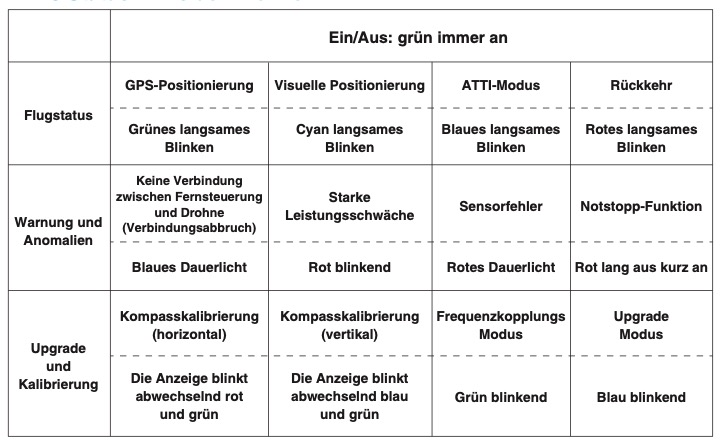
Grundlegende LED-Anzeigen
Flugstatus-Anzeigen
Warnungen und Anomalien
Upgrade und Kalibrierung
Intelligenter Akku mit vielen Schutzfunktionen
Die Technologie der Drohnen hat in den letzten Jahren erhebliche Fortschritte gemacht. Ein wesentlicher Bestandteil dieser Technologieentwicklung ist der Akku, der die Potensic Atom antreibt. Die Potensic Atom-Drohne ist mit einer hochmodernen intelligenten Batterie ausgestattet, die zahlreiche fortschrittliche Funktionen bietet.
Grundlegende Eigenschaften der Batterie
Besondere Funktionen der intelligenten Batterie
Hinweise zur Batterieaufbewahrung und zum Akku
Sollte die Batterie längere Zeit nicht genutzt werden, ist es empfehlenswert, sie alle drei Monate aufzuladen, um ihre Lebensdauer zu verlängern. Zudem sollte sie an einem kühlen und trockenen Ort aufbewahrt werden, außerhalb der Reichweite von Kindern. Der intelligente Akku der Potensic Atom-Drohne bietet eine Vielzahl von fortschrittlichen Funktionen, die sie sicher, zuverlässig und effizient machen. Durch das Verständnis dieser Funktionen können Benutzer die Batterie optimal nutzen und ihre Lebensdauer maximieren. Es ist wichtig, sich stets an die Sicherheitshinweise und Empfehlungen des Herstellers zu halten, um die bestmögliche Leistung der Batterie zu gewährleisten.
Der Akku der Potensic Atom-Drohne: Wissenswertes und Tipps
Die Potensic Atom-Drohne zeichnet sich durch ihre fortschrittliche Technologie und beeindruckende Funktionen aus. Ein zentrales Element dabei ist ihr Akku. Nicht nur versorgt er die Drohne mit der nötigen Energie, sondern trägt auch wesentlich zu ihrer Sicherheit und Leistungsfähigkeit bei.
Einsetzen und Herausnehmen des Akkus
Beim Einsetzen des Akkus in deine Potensic Atom-Drohne solltest du darauf achten, ihn zuerst horizontal in das dafür vorgesehene Fach zu schieben. Ein deutliches „Klick“-Geräusch zeigt dir, dass der Akku richtig sitzt und sicher verriegelt ist. Um den Akku herauszunehmen, drückst du zuerst auf den Entriegelungsknopf bzw. die Schnalle und hältst dann die obere Abdeckung fest, um ihn herauszuziehen. Es ist wichtig, dass die Schnalle des Akkus korrekt einrastet. Das verhindert, dass der Akku während des Fluges herausfällt und sorgt für mehr Sicherheit.
Tipps für den Einsatz bei extremen Temperaturen
Der Akku deiner Potensic Atom-Drohne braucht bei extremen Temperaturen besondere Aufmerksamkeit. Wenn es kälter als 5°C ist, wird dir die App eine Warnung wegen niedriger Akkutemperatur anzeigen. Bei Temperaturen über 70°C solltest du ebenfalls vorsichtig sein. Vor dem Flug ist es ratsam, den Akku aufzuwärmen, besonders bei kühlem Wetter. Beachte, dass die Lebensdauer des Akkus bei dauerhafter Nutzung in der Kälte beeinträchtigt werden kann. Daher ist es besser, die Drohne bei moderaten Temperaturen zu fliegen, um die bestmögliche Leistung und Langlebigkeit des Akkus zu sichern.
Kurz und knapp:
So verstehst du den Ladezustand deines Akkus für die Potensic Atom-Drohne
Ladezustand prüfen: Sobald du den Akku in deine Potensic Atom-Drohne eingelegt hast, kannst du den Ladezustand leicht über die Power-Taste prüfen. Dank der intelligenten LEDs siehst du auf einen Blick, wie viel Energie noch vorhanden ist. Die LEDs zeigen dir von 0% bis 100% klar an, wie viel Flugzeit dir noch bleibt. Das LED-System befindet sich auf der Rückseite der Drohne, wie im beigefügten Bild dargestellt. Es besteht aus vier LEDs (LED 1 bis LED 4) und einer Power-Taste. Die Kombination aus leuchtenden, blinkenden und ausgeschalteten LEDs gibt dir eine klare Vorstellung vom aktuellen Ladezustand:
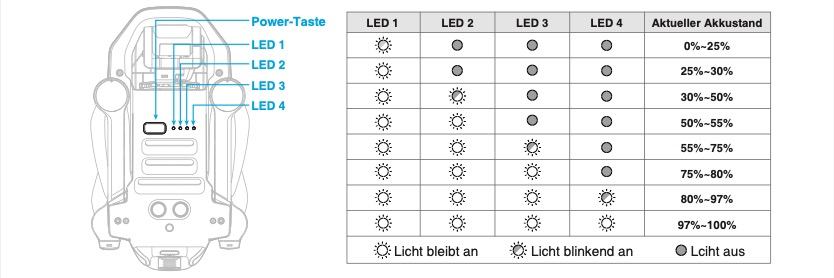
Merke: Ein durchgehend leuchtendes Licht zeigt einen stabilen Ladezustand in dem jeweiligen Bereich an, während ein blinkendes Licht den Übergang zum nächsten Ladebereich anzeigt.
Propeller der Potensic Atom-Drohne
Die Potensic Atom-Drohne besitzt ein ausgeklügeltes Propellersystem, das darauf ausgelegt ist, für maximale Effizienz und Sicherheit zu sorgen. Es gibt jedoch einige Dinge, die du beachten solltest, um sicherzustellen, dass deine Drohne immer reibungslos fliegt.
Arten von Propellern
Die Propeller deiner Atom-Drohne sind in zwei verschiedene Typen unterteilt:
Es ist wichtig zu beachten, dass zwei Propellerblätter am gleichen Motor identisch sein sollten. Das bedeutet, dass du keinen markierten Propeller mit einem unmarkierten Propeller am gleichen Motor kombinieren solltest.
Einbauanleitung für die Propeller
Werkzeuge und Ersatzteile
Das mitgelieferte Set enthält einen speziellen Schraubendreher und Ersatz-Propeller, um den Austausch so einfach wie möglich zu gestalten. Wenn du die Propellerblätter aus- oder einbaust, ist es einfacher, den Motor mit der Hand zu halten. Dies gibt dir mehr Kontrolle und verhindert, dass sich etwas verklemmt.
Hinweise zur korrekten Verwendung von Propellern
Die richtige Verwendung und Montage von Propellern ist von entscheidender Bedeutung für die Sicherheit und Effizienz von Drohnen. Die folgenden Informationen bieten detaillierte Anweisungen und Empfehlungen für den Umgang mit Propellern der Potensic Atom.
Wichtige Punkte bei der Montage von Propellern
Sicherheitshinweise
Hochwertige Bildgebung
Kamera mit Sony CMOS-Sensor und 4K/30fps-Videoaufnahme
Die Potensic Atom-Drohne verfügt über eine hochwertige Kamera, die beeindruckende Bilder und Videos festhält. Mit dieser Drohne bist du in der Lage, deine Abenteuer und besonderen Momente in hervorragender Qualität festzuhalten. Tauchen wir tiefer in die technischen Spezifikationen und Eigenschaften dieser Kamera ein.
Bildqualität: Dank des 12-Megapixel-Sony-Bildsensors sind die von der Drohne aufgenommenen Bilder von außergewöhnlicher Qualität. Mit einer solchen Auflösung kannst du jedes Detail festhalten einer atemberaubenden Landschaft festhalten. Der erweiterte ISO-Bereich sorgt dafür, dass du auch bei schwierigen Lichtverhältnissen, sei es in der Dämmerung oder bei strahlendem Sonnenschein, klare und rauscharme Bilder erhältst.
Videoqualität: Die Fähigkeit, Videos in 4K-Auflösung aufzunehmen, hebt die Potensic Atom-Drohne von vielen ihrer Konkurrenten ab. Die verschiedenen Bildraten, insbesondere in 1080p bzw. FullHD mit maximal 60 Bildern pro Sekunde oder 4K mit maximal 30 Bildern pro Sekunde, ermöglichen es dir, die Bewegungen in deinen Videos genau so zu gestalten, wie du es dir vorstellst, ob flüssig oder in Zeitlupe.
Bildwiedergabe: Mit einem FOV von 78° kann die Kamera weite Landschaften und Panoramen einfangen, so dass du das Gefühl hast, mitten im Geschehen zu sein, wenn du dir die Aufnahmen ansiehst. Das MP4-Videoformat und die Bildformate JPG, JPG+RAW und DNG garantieren eine breite Kompatibilität und Flexibilität bei der Nachbearbeitung. Ob du nun farbenfrohe Szenen oder scharf fokussierte Objekte einfangen möchtest, die Bildwiedergabe dieser Drohne wird dich nicht enttäuschen.
Alles in allem ist die Potensic Atom-Drohne das perfekte Werkzeug für alle, die nicht nur fliegen, sondern auch atemberaubende visuelle Erlebnisse schaffen möchten. Mit dieser Drohne in deinem Arsenal kannst du sicher sein, dass jeder Moment, den du einfängst, in bestmöglicher Qualität festgehalten wird.
Hauptmerkmale der Kamera
Video- und Bildformate
Besondere Hinweise zur Nutzung
microSD-Speicherkarte für die Potensic Atom-Drohne
Wenn du beeindruckende Aufnahmen mit der Potensic Atom-Kameradrohne machst, ist es wichtig zu wissen, wie und wo diese Daten gespeichert werden. Ein zentrales Element bei der Datenspeicherung dieser Drohne ist die microSD-Speicherkarte.
Zunächst einmal ist es wichtig zu betonen, dass die mit der Potensic Atom-Drohne aufgenommenen Videos und Fotos direkt auf der microSD-Karte gespeichert werden und nicht im internen Speicher der Drohne oder in der App auf dem Telefon des Benutzers. Daher ist es unerlässlich, vor dem Flug sicherzustellen, dass die microSD-Karte ordnungsgemäß in die Drohne eingelegt ist. Wenn dies nicht der Fall ist, könnten wertvolle Aufnahmen verloren gehen, da keine Speicherung von Fotos und Videos möglich ist.
Es ist auch möglich, aufgenommene Videos und Fotos direkt von der microSD-Karte in der App anzusehen und herunterzuladen, solange die Drohne und das Smartphone miteinander verbunden sind. Beim Thema Speicherkarte für die Potensic Atom gibt es einige technische Aspekte zu beachten:
Ein paar zusätzliche Hinweise zur Nutzung der microSD-Karte in der Potensic Atom-Drohne:
Abschließend ist es wichtig zu betonen, dass die Potensic Atom-Drohne nicht für Schäden verantwortlich gemacht wird, die durch unsachgemäße Handhabung der microSD-Karte durch den Benutzer entstehen. Es liegt in der Verantwortung des Benutzers, die Karte richtig zu handhaben und sicherzustellen, dass sie korrekt funktioniert.
3-Achsen Gimbal: Vorteile und Neigebereich
Die Potensic Atom-Drohne ist mit einem modernen 3-Achsen-Gimbal ausgestattet, der es dir ermöglicht, gestochen scharfe und stabilisierte Bilder sowie Videos zu erfassen. Damit du das volle Potential deines Geräts ausschöpfen kannst und für eine lange Lebensdauer des Gimbals sorgst, haben wir eine detaillierte Übersicht mit Steuerungsfunktionen und Sicherheitsanweisungen zusammengestellt.
Steuerungsfunktionen des Gimbals
Sicherheits- und Pflegehinweise
Verbesserte Positionierung und Flugmerkmale
Intelligente Flugfunktionen
Kameraeinstellungen
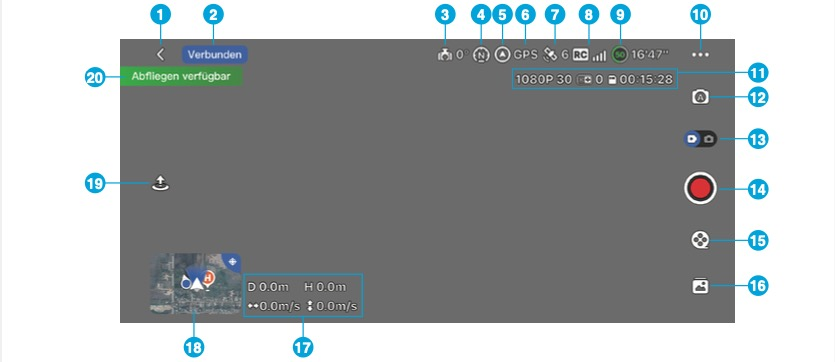
Anzeige und Einstellungen der Aufnahmeinformationen (11)
Die Bedienung und Konfiguration moderner Kameras und Drohnen erfordert oft spezifische Einstellungsmöglichkeiten, um optimale Ergebnisse zu erzielen. Im Folgenden sind die verschiedenen Optionen und Anzeigemöglichkeiten innerhalb der PotensicPro-App dargestellt, die dem Nutzer in Bezug auf Aufnahmeinformationen (11) zur Verfügung stehen:
Fotomodus
Videomodus
Zusammenfassend bieten diese Einstellungsoptionen dem Anwender eine umfassende Kontrolle über die Aufnahmequalität und -parameter, sodass sowohl Anfänger als auch Profis in der Lage sind, ihre gewünschten Ergebnisse zu erzielen.
Kameraeinstellungen im Manuell- und Auto-Modus (12)
Die modernen Kamerasysteme bieten eine Vielzahl an Einstellungsmöglichkeiten, um die Aufnahmequalität zu optimieren:
Umschaltung zwischen Foto- und Videomodus (13)
Mit einem einfachen Tastendruck kann zwischen den Modi gewechselt werden:
Steuerung von Foto- und Videoaufnahmen (14)
Die Benutzeroberfläche ermöglicht eine intuitive Bedienung:
Intelligenter Flugmodus (15)
Moderne Drohnen verfügen über intelligente Flugmodi, die das Fliegen und Filmen erleichtern:
Galerie (16)
Die Galerie bietet eine Übersicht aller aufgenommenen Videos und Fotos, die auf der microSD-Speicherkarte gespeichert sind. Hier können Nutzer ihre Aufnahmen vorab betrachten oder auf andere Geräte herunterladen.
Anzeige von Fluggeschwindigkeit und Entfernung (17)
Für eine sichere und effiziente Flugsteuerung zeigt die Drohne wichtige Fluginformationen an:
Sphärische Einstellung und Miniaturbildkarte (18)
Ein besonderes Feature ist die sphärische Darstellung:
Sphärische Einstellung der Potensic Atom-Drohne: Ein Überblick
Die Technologie hinter Drohnen hat in den letzten Jahren beachtliche Fortschritte gemacht. Ein Aspekt, der in der Diskussion oft zu kurz kommt, jedoch für die Navigation und Steuerung von Drohnen von entscheidender Bedeutung ist, stellt die „Sphärische Einstellung“ dar. Bei der Potensic Atom-Drohne ermöglicht dieses System dem Nutzer, in Echtzeit Informationen über verschiedene Parameter zu erhalten, was die Flugerfahrung signifikant aufwerten kann.
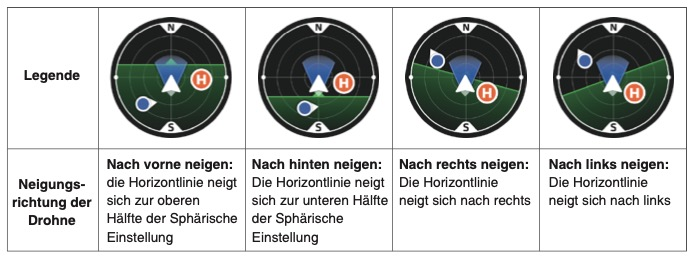
Verständnis der Neigung und Richtung
Im Mittelpunkt der Sphärischen Einstellung der Potensic Atom-Drohne steht die Darstellung von Neigungsrichtungen. Die Potensic Atom-Drohne kann in unterschiedliche Richtungen geneigt werden:
Farbindikatoren und ihre Bedeutungen
Farben nehmen eine entscheidende Rolle bei der Interpretation der Sphärischen Einstellung ein:
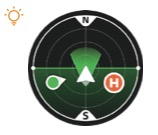
Zusätzliche Symbole und Hinweise
Symbole für die Potensic Atom-Drohne und die Fernsteuerung sind ebenfalls auf dem Display dargestellt. Wenn beide Symbole leuchten, ist eine optimale Kommunikation zwischen der Drohne und der Fernsteuerung gewährleistet. Wichtig ist zudem der Hinweis, dass beim Wechsel in den GPS-Modus die aktuellen GPS-Koordinaten als HOME-Punkt definiert werden. Daher ist stets auf die Aktualisierungsaufforderung des HOME-Punkts zu achten.
Zum Schluss ein weiterer essentieller Hinweis: Startet die Potensic Atom-Drohne im OPT-Modus und wechselt anschließend in den GPS-Modus, wird der Startpunkt nicht als HOME-Punkt festgelegt. Die Rückkehrssicherheit sollte deshalb immer im Blick behalten werden.
Die Sphärische Einstellung bei der Potensic Atom-Drohne ist ein hochwertiges Tool für Drohnenpiloten. Sie liefert nicht nur wertvolle Informationen über die aktuelle Position und Neigung der Drohne, sondern auch Sicherheitshinweise, die zu einer sicheren und effizienten Navigation der Drohne beitragen.
Starten und Landen der Potensic Atom
Als Pilot der Potensic Atom-Drohne weißt du, dass Start und Landung zu den kritischen Phasen eines Flugs gehören. Doch mit der PotensicPro App werden diese Momente zum Kinderspiel. Je nach Status deiner Potensic Atom-Drohne werden dir verschiedene Schaltflächen angezeigt. Mit nur einem Klick kannst du:
Um sicher und problemlos zu fliegen, musst du immer über den aktuellen Status deiner Potensic Atom-Drohne informiert sein. Die PotensicPro App hilft dir dabei:
Wichtig: Die Verantwortung für den sicheren Betrieb liegt bei dir. Die PotensicPro App ist ein großartiges Tool, um das Flugerlebnis mit deiner Potensic Atom-Drohne zu verbessern, aber denk immer daran, alle Hinweise und Anweisungen sorgfältig zu befolgen.
Starten und Landen mit der Potensic Atom-Drohne per Knopfdruck
Die Potensic Atom-Drohne bietet Dir eine einfache und intuitive Möglichkeit, den Flug zu starten und zu beenden. Mit nur einem Tastendruck in der App kannst Du sowohl den Start als auch die Landung steuern.
Starten mit einer Taste: Möchtest Du Deine Drohne starten, tipp einfach in der App auf die Start-Taste 🛫. Ein Pop-up-Fenster wird daraufhin angezeigt. Wisch in diesem Fenster nach rechts, um die Potensic Atom-Drohne automatisch starten zu lassen. Sie wird dann auf eine Höhe von 1,2 Metern aufsteigen und sich in den Schwebeflug begeben.
Landen mit einer Taste: Wenn es an der Zeit ist, Deine Drohne wieder sicher zu Boden zu bringen, klicke in der App auf die Landung-Taste 🛬. Ein weiteres Pop-up-Fenster wird erscheinen. Hier hast Du die Wahl: Wisch nach links, um die Drohne direkt zu landen. Möchtest Du jedoch, dass die Drohne zuerst zu ihrem Ausgangspunkt zurückkehrt, wisch einfach nach rechts.
Die intuitive Steuerung der Potensic Atom-Drohne macht es auch Anfängern leicht, den Flug zu starten und zu beenden. So kannst Du Dich voll und ganz auf das Flugerlebnis konzentrieren und die beeindruckenden Luftaufnahmen genießen.
Flugmodus Aufnahme, Normal und Sport
Die Potensic Atom-Drohne bietet drei verschiedene Flugmodi an: Aufnahme, Normal und Sport. Diese Modi können in den App-Einstellungen angepasst werden.
Aufnahme:
Normal:
Sport:
Ein wichtiger Hinweis: Sei im Sportmodus stets wachsam und sorge für ausreichend Manövrierraum. Die erhöhte Reaktionsfähigkeit in diesem Modus kann anspruchsvoller sein. Unter windigen Bedingungen ist ein Mindestabstand von 30 m erforderlich, um die Sicherheit zu gewährleisten. Wenn Du im Sportmodus fliegst und starker Wind aufkommt oder der Gimbal zu vibrieren beginnt, ist es ratsam, die Drohne so schnell wie möglich zu landen.
Anfängermodus der Potensic Atom-Drohne
Wenn Du die Potensic Atom-Drohne zum ersten Mal in Betrieb nimmst, startet sie standardmäßig im Anfängermodus. Dieser Modus ist speziell darauf ausgelegt, Neulingen den Einstieg in die Drohnenfliegerei zu erleichtern.
Der Anfängermodus der Potensic Atom-Drohne ist also die perfekte Einstellung für alle, die sich langsam und sicher an das Thema Drohnenflug herantasten möchten.
PotensicPro-App
Features und Vorteile der App
Die PotensicPro-App ist ein Muss für jeden Drohnen-Enthusiasten, besonders, wenn du eine Potensic Atom-Drohne besitzt. Gleich wenn du die App öffnest, siehst du die übersichtliche Startseite. Ganz oben findest du den Namen der Drohne: „Potensic ATOM“, neben einem anschaulichen Bild der Drohne selbst. An der oberen Ecke ist ein Menü-Icon. Wenn du darauf tippst, zeigt es dir verschiedene Optionen: Du kannst dir das Tutorial oder die Bedienungsanleitung anschauen und sogar die Flugaufzeichnung und das Flugbuch einsehen. Ein cooles Feature ist, dass du zwischen verschiedenen Drohnen-Modellen wechseln kannst. sofern du noch andere Drohnen der Marke Potensic zuhause hast. Wenn dein Handy schon mit der Fernbedienung verbunden ist, stellt die App automatisch auf das richtige Modell um. Das ist super praktisch!
Weiter unten auf der Startseite gibt es verschiedene Icons. Eines davon ist die „Verbindungsanleitung“. Das hilft dir, die Drohne problemlos mit deinem Smartphone zu verbinden. Nebendran findest du die Option „Gerät aufrufen“. Hiermit öffnest du die Flugschnittstelle bzw. den Live View der Drohnen-Kamera und du hast alle Flugfunktionen direkt im Griff. Unter dem Icon „Mich“ kannst du verschiedene persönliche Einstellungen vornehmen: ein Problem melden, deine Kontodaten ändern, die Nutzungsvereinbarung checken, nach der Drohne suchen oder dich ausloggen. Wenn du möchtest, kannst du hier auch deinen Account löschen. Last but not least gibt es die In-App-Galerie. Hier siehst du alle Inhalte, die auf der microSD-Speicherkarte in der Potensic Atom-Drohne gespeichert sind. Aber Achtung: Du musst deine Drohne mit dem Handy verbinden, um eine Vorschau zu sehen.
Verbindung. Live View und Nutzung mit der Potensic Atom-Drohne
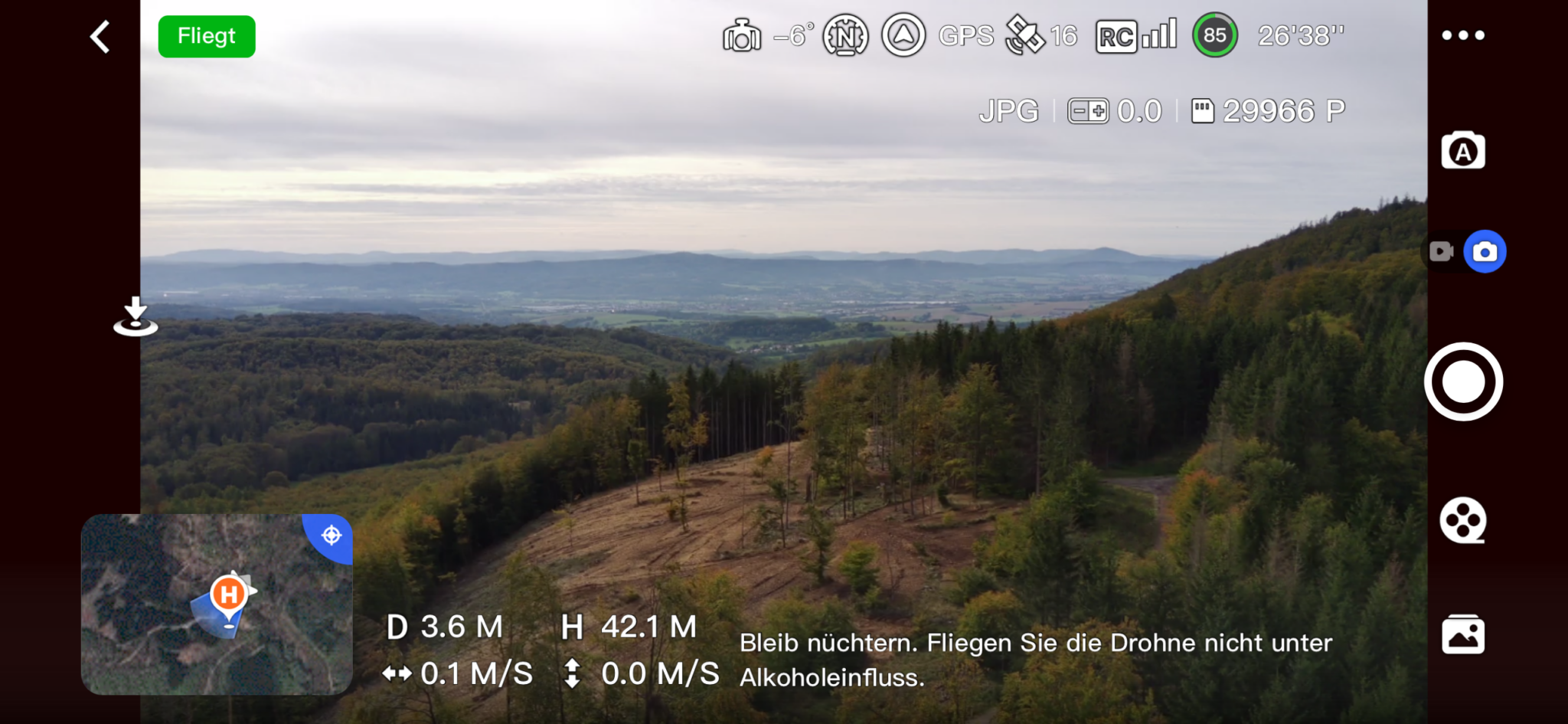
Wenn du mit deiner Potensic Atom-Drohne abheben möchtest, ist die Flugschnittstelle in der PotensicPro-App genau das, was du brauchst. Diese Schnittstelle bietet dir eine intuitive Bedienung und alle Informationen, die du für einen erfolgreichen Flug benötigst. Ganz links findest du die Zurück-Taste. Ein einfacher Tap darauf, und du kehrst zur Startseite der App zurück. Direkt daneben siehst du die Navigationssymbolleiste, die dir den aktuellen Drohnenstatus und den ausgewählten Flugmodus anzeigt. Der Gimbal-Winkel ist ebenfalls angezeigt und gibt dir Auskunft über den aktuellen Neigungswinkel des Gimbals. Das ist super hilfreich, um die Kamera der Drohne optimal auszurichten. In Bezug auf den Flugmodus hast du verschiedene Optionen zur Auswahl:
Außerdem gibt es den Kopf/Kopflos Modus. Im Kopf-Modus folgt die Drohne der Ausrichtung des Piloten, während im Kopflos-Modus die Vorderseite der Drohne immer in Flugrichtung zeigt. Oben rechts auf der Schnittstelle findest du eine Reihe von Icons. Eines dieser Symbole zeigt den Positionierungsmodus an. Es gibt drei Modi zur Auswahl:
Weitere Icons geben dir Informationen über den GPS-Status, einschließlich des GPS-Signalstatus und der Anzahl der verbundenen Satelliten. Die Videoübertragungsqualität wird durch Balken dargestellt, die dir zeigen, wie stark das Videostreaming-Signal zwischen Drohne und Fernbedienung ist. Ein besonders nützliches Feature ist die Anzeige des Akkustands der intelligenten Batterie der Drohne. Ein Batterie-Icon gefolgt von einer Zeitangabe zeigt dir die voraussichtliche verbleibende Flugzeit an.
Intelligente Aufnahmemodi: QuickShots mit Rocket, Boomerang uvm.
Einführung in QuickShots
Mit den QuickShots der Potensic Atom-Drohne bist Du in der Lage, beeindruckende Luftaufnahmen zu erstellen. Diese speziellen Flugmodi, darunter Rückwärts, Rocket, Kreisen, Spirale und Boomerang, ermöglichen es Dir, das Ziel gemäß dem ausgewählten QuickShots-Modus automatisch aufzunehmen. Das Ergebnis ist ein kurzes Video, das direkt auf Deiner MicroSD-Karte gespeichert wird.
Starten der QuickShots:
Beenden der QuickShots:
Detaillierte Beschreibung der QuickShots-Modi
Durch diese vielfältigen QuickShots-Modi der Potensic Atom-Drohne kannst Du atemberaubende und kreative Luftaufnahmen erstellen, ohne ein Drohnen-Experte zu sein. Es lohnt sich, jeden Modus auszuprobieren und die beeindruckenden Ergebnisse zu genießen.
Hinweise zur Verwendung von QuickShots mit der Potensic Atom-Drohne
Bedingungen für die Aktivierung von QuickShots: Bevor Du mit der Potensic Atom-Drohne atemberaubende QuickShots-Aufnahmen machst, gibt es einige wichtige Bedingungen zu beachten:
Sicherheitshinweise: Nutze QuickShots nur mit der Potensic Atom-Drohne an Orten, die frei von Gebäuden und anderen Hindernissen sind. Stelle sicher, dass sich keine Menschen, Tiere oder andere Hindernisse auf der Flugbahn befinden. Falls Du noch nicht mit QuickShots vertraut bist, teste es zuerst mit einer kürzeren Flugdistanz. Sei immer bereit, die Kontrolle über die Potensic Atom-Drohne zu übernehmen, indem Du den Steuerknüppel bewegst. Die Potensic Atom-Drohne verlässt den QuickShots-Modus und schwebt, wenn nötig, in ihrer Position. Sei immer auf der Hut vor möglichen Kollisionen und vermeide Gebiete mit schwachem GPS-Signal.
Wann sind QuickShots nicht verfügbar? Es gibt bestimmte Situationen, in denen Du QuickShots mit der Potensic Atom-Drohne nicht verwenden kannst:
Warnhinweise zur Verwendung: Verwende QuickShots nicht in folgenden Situationen:
Bitte beachte, dass QuickShots mit der Potensic Atom-Drohne keine Videoaufnahmen in 1080P bei 60fps unterstützt. Nachdem ein Motiv in QuickShots fixiert wurde, ist eine Anpassung des Neigungswinkels des Gimbals der Potensic Atom-Drohne nicht mehr möglich. Zum Abschluss, immer daran denken, die Datenschutzgesetze und -vorschriften in Deinem Bereich einzuhalten. Viel Spaß beim Fliegen!
Fazit und Bewertung
Die Potensic Atom Mini-Drohne repräsentiert die nächste Generation der Drohnentechnologie, bei der Kompaktheit auf High-End-Funktionalität trifft. Mit einem beeindruckenden Gewicht von unter 250 Gramm überzeugt sie vor allem durch ihre Handlichkeit, ohne dabei Kompromisse bei der Leistung einzugehen. Dies macht sie nicht nur für Hobbyflieger, sondern auch für Profis interessant. Ein Hauptmerkmal dieser Drohne ist das fortschrittliche visuelle Positionierungssystem, das nicht nur für eine präzise Schwebefähigkeit sorgt, sondern auch durch eine automatische Rückkehrfunktion zusätzliche Sicherheit gewährleistet. Die Integration einer 4K-Kamera samt Sony-Bildsensor, die Videos in 4K-Auflösung aufnimmt und Bilder mit bis zu 30 fps und 12-Megapixel-Auflösung liefert, setzt Maßstäbe im Mini-Drohnen-Segment.
Technologisch gesehen sticht die PixSync 3.0-Übertragungstechnologie hervor. Sie ermöglicht eine Kommunikation über eine Distanz von bis zu 6 Kilometern mit einer beeindruckenden Videoqualität von 720p. Gekoppelt mit einer Laufzeit von etwa 2,3 Stunden dank der leistungsstarken Lithium-Batterie, bietet sie dem Benutzer eine umfangreiche Flugerfahrung. Die wachsende Bedeutung von Mini-Drohnen im aktuellen Markt kann nicht übersehen werden. Sie sind wegen ihrer Kompaktheit und Leichtigkeit besonders beliebt bei Hobbyfotografen und Technikbegeisterten. Mit der Einführung der Potensic Atom zeigt Potensic, dass sie die Bedürfnisse und Anforderungen der Konsumenten verstanden haben. Die Kombination aus neuester Technologie, wie der 4K-Kamera und dem GPS-gestützten Positionierungssystem, mit dem kompakten Design trifft genau den Nerv der Zeit.
Zusammenfassend ist die Potensic Atom Mini-Drohne ein Paradebeispiel für innovative Technologie im kompakten Design. Mit ihren technischen Spezifikationen und Funktionen steht sie im Mittelpunkt des Mini-Drohnen-Marktes und setzt neue Standards in Bezug auf Leistung, Sicherheit und Bedienbarkeit. Es ist klar, dass solche Produkte wie die Atom-Drohne von Potensic genau das bieten, was der moderne Verbraucher von einer hochwertigen Mini-Drohne erwartet.
Auch im Hinblick auf die EU-Drohnenverordnung aus dem Jahr 2021 ist die Potensic Atom eine zukunftssichere Investition. Durch das geringe Gewicht von unter 250 Gramm hat die Drohne dank ihrer C0-Klassifizierung nahezu keine Einschränkungen. Allerdings sind Registrierung des Piloten und ein EU-Drohnenkennzeichen sind für die Potensic Atom erforderlich.
Wichtiger Tipp: Auch für die Potensic Atom ist eine Drohnenversicherung gesetzlich Pflicht! Zu unserem Versicherungsvergleich:
Inhalt & Übersicht
EU-Drohnenverordnung
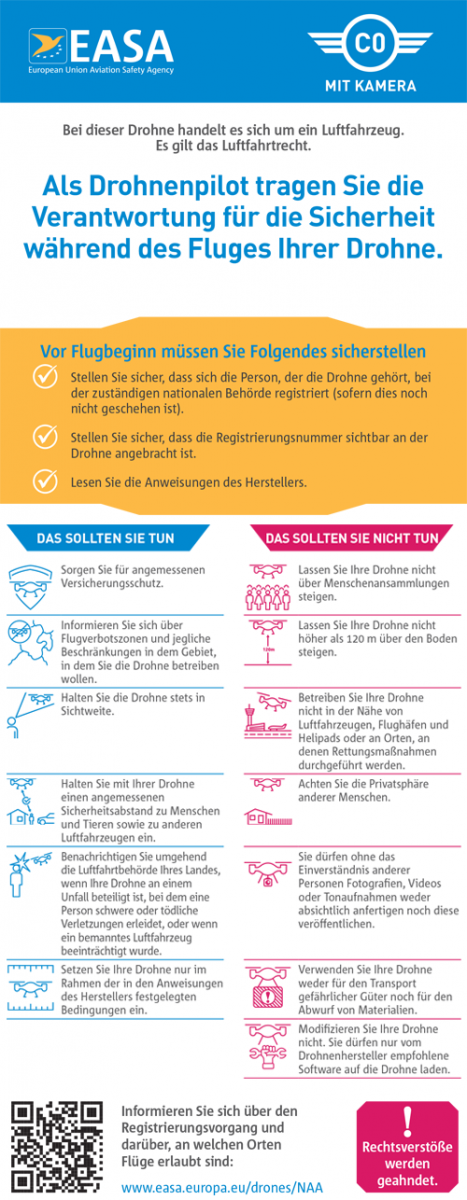
Merkblatt:
UAS-99-1-ALW-Shortcut-20-4.pdf
Docker
Bookstack: https://bst.wkmimnl.de
Calibre: https://libre.wkmimnl.de
Photoprism: https://foto.wkmimnl.de
IGEL Mediacenter:
Kodi: https://mm.wkmimnl.de
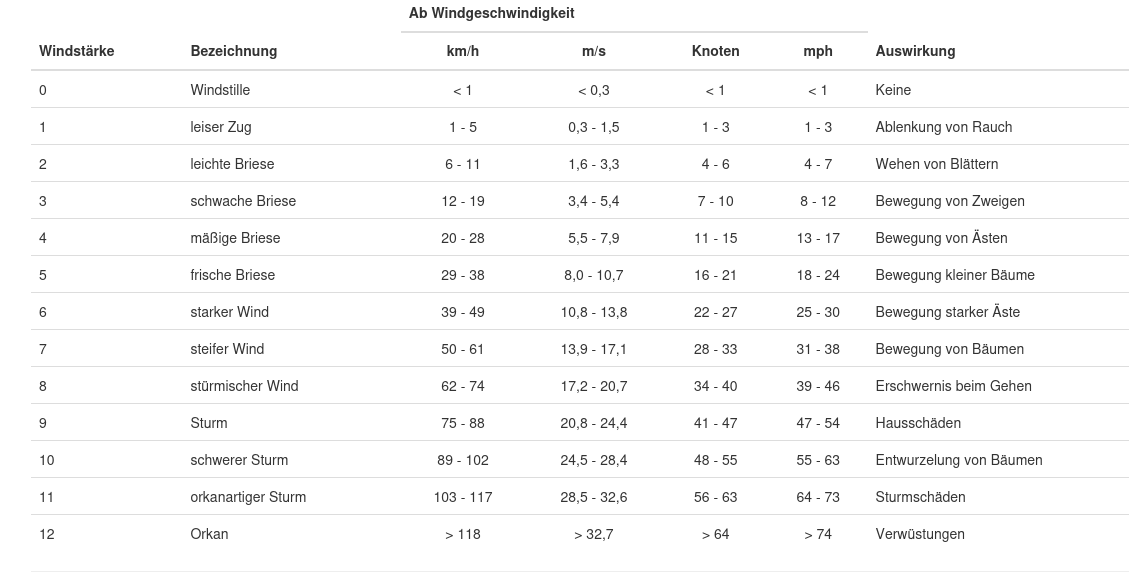
Windstärken
Mikrowelle
An der Mikrowelle die richtige Wattzahl einstellen
Benutzen Sie immer mikrowellengeeignetes Geschirr, wenn Sie Ihre Speisen mit der Mikrowelle zubereiten möchten. Nachdem Sie die Tür geschlossen haben, stellen Sie die gewünschte Watt-Leistung wie in der Gebrauchsanleitung des jeweiligen Gerätes beschrieben ein. Einen Überblick über die wichtigsten Leistungsstufen haben wir hier zusammengefasst.
- 1000 Watt: Hierbei handelt es sich um die höchste Leistungsstufe. Sie können damit Flüssigkeiten erhitzen. Nach kurzer Zeit schmeckt damit ein kalt gewordener Kaffee wieder wie frisch aus der Kaffeemaschine.
- 850 bis 600 Watt: Die Leistungsstufen können Sie für alles benutzen. Egal ob Sie etwas aufwärmen, garen, kochen oder sogar braten möchten, das alles ist möglich. Sie können damit wunderbar auch feste Konsistenzen schmelzen. Kuvertüren, Schokolade oder auch fest gewordener Tortenguss sind nach kürzester Zeit wieder gebrauchsfertig.
- 450 bis 360 Watt: Auch diese Leistungsstufen eignen sich zum Erhitzen oder Braten. Haben Sie Gerichte, die aus mehreren Komponenten bestehen (z.B. Kartoffeln, Gemüse und Fleisch auf einem Teller), werden diese gleichmäßig in der Mikrowelle erwärmt. Damit die Flüssigkeit nicht verdunstet, sollten Sie den Teller oder das Gefäß mit einem geeigneten Deckel abdecken.
- 250 bis 180 Watt: Diese Leistungsstufen können Sie nutzen, wenn Sie Speisen auftauen möchten. Insbesondere Fleisch und Geflügel lassen sich so gut auftauen, aber auch Brötchen. Bereiten Sie Speisen zu, die quellen müssen, können Sie das Quellen ebenfalls in dieser Einstellung vornehmen.
- 90 Watt: Diese Stufe nutzen Sie immer dann, wenn Sie etwas auftauen möchten und es sich dabei um eine empfindliche Speise handelt. Hierzu gehören z.B. Butter und Quark. Sie können 90 Watt aber auch dafür benutzen, um Speisen warmzuhalten.
Wie Ihre Fritteuse und andere Haushaltsgeräte zu Datensammler werden
Haben Sie beim Kauf Ihrer schicken Fritteuse gedacht, es geht nur um perfekt knusprige Zwiebelringe? Tatsächlich könnte sie Ihre Daten auf einem Silbertablett an die globalen Tech-Giganten liefern.
Die britische Verbraucherschutzorganisation Which? hat die dunkle Seite der „smarten“ Geräte enthüllt: Ihre Fritteuse könnte nicht nur Ihre Kalorien im Blick haben, sondern auch tief in Ihr Privatleben eintauchen.
Die Bequemlichkeit eines Wi-Fi-fähigen Küchengeräts kommt mit einer ordentlichen Portion Überwachung daher, und Fritteusen sind nur die Vorspeise in diesem Bankett von invasiven intelligenten Geräten.
Alexa, warum benötigt meine Heißluftfritteuse mein Geburtsdatum?
Bei einem Test von Produkten aus vier Kategorien – Heißluftfritteusen, Smartwatches, smarte Lautsprecher und intelligente Fernseher – enthüllte die britische Verbraucherschutzorganisation „Which?“ einen regelrechten Albtraum des Datensammelns. Besonders absurd: Eine Heißluftfritteuse verlangte tatsächlich die Erlaubnis, das Telefon der Nutzer abzuhören. Ja, richtig gelesen – Audioaufzeichnung, weil eine Fritteuse offenbar unbedingt mitlauschen muss, wenn Sie sich gerade über das perfekte Gewürz beraten.
Ein anderes Gerät von Xiaomi ging noch einen Schritt weiter und verknüpfte seine App mit dem „Who is Who“ der Daten-Tracker, darunter Facebook, TikToks Pangle und Tencent. Brauchen Sie eine Minute, um das zu begreifen? Nehmen Sie sich Zeit, denn Ihre Unentschlossenheit wird bereits protokolliert. Auch die Friteusen von Aigostar und Xiaomi übermitteln Ihre persönlichen Daten an Server in China. Dies wurde in ihren Datenschutzhinweisen offengelegt, denn Transparenz bedeutet nichts, wenn sie in juristischem Fachjargon vergraben ist, den Sie nie lesen.
Das wirft die offensichtliche Frage auf: Wozu benötigt man eine Fritteuse, die gleichzeitig als Datensauger dient? Spoiler: Sie brauchen sie nicht. Aber sie verkaufen Ihre Gewohnheiten, Vorlieben und sogar Ihr Geschlecht und Geburtsdatum für Marketingzwecke und möglicherweise für die globale Datenherrschaft.
Intelligente Lautsprecher und dumme Entscheidungen
Die Untersuchung ergab, dass die intelligenten Lautsprecher von Amazon Echo einen flüchtigen Hoffnungsschimmer bieten: Sie können einige Aufforderungen zur Datenfreigabe während der Einrichtung überspringen. Aber machen Sie es sich nicht zu gemütlich. Um das Gerät zu verwenden, benötigen Sie immer noch ein Amazon- oder Google-Konto, was vorhersehbar dafür sorgt, dass das Mutterschiff einen ständigen Strom Ihrer Daten erhält.
Der Bose Home Portable-Lautsprecher versuchte, den Datenschutz-Heiligen zu spielen, indem er von vornherein um minimale Erlaubnis bat. Doch unter der Oberfläche verbirgt sich ein Rattennest von Trackern, darunter Facebook und Google. Bose, so scheint es, hat die Kunst perfektioniert, tugendhaft zu erscheinen und gleichzeitig Ihre Daten zu horten wie ein Schnäppchen am schwarzen Freitag.
Smartwatches: Der Narc am Handgelenk
Sie denken darüber nach, Ihr Handgelenk aufzurüsten? Denken Sie anders. Zwei preiswerte Smartwatches, die auf Amazon verkauft werden, Kuzil und WeurGhy, wurden als nahezu identische Produkte entlarvt, die kaum funktionieren, es sei denn, Sie geben Ihre Zustimmung zum Datenschutz ab. Ohne diese Zustimmung, herzlichen Glückwunsch, haben Sie eine dumme Uhr gekauft, die nur die Zeit anzeigt.
Die Ultimate-Smartwatch von Huawei geht noch einen Schritt weiter und fordert neun „riskante“ Telefonberechtigungen an, die ihr uneingeschränkten Zugriff auf Ihre Dateien, Ihren Standort, Ihre Audiodaten und sogar einen Blick auf Ihre anderen Apps gewähren. Wenn Sie sich jetzt eine Smartwatch umschnallen, klingt das eher nach einem Onboarding von Big Brother als nach einem Upgrade Ihrer Technik.
Fernsehgeräte: Sie beobachten, wie Sie sie beobachten
Dann gibt es noch die Smart-TVs. Hisense und Samsung verlangen bei der Einrichtung unter dem Vorwand der „Inhaltslokalisierung“ eine Postleitzahl. Samsung besteht darauf, dass dies optional ist, obwohl Which? fand das Gegenteil heraus. Die TV-App von Samsung verlangte dagegen acht Berechtigungen, darunter die Möglichkeit, alle installierten Apps einzusehen. Das ist richtig: Ihr Fernseher macht sich Notizen über Ihre App-Bibliothek, während Sie Ihre Lieblingssendungen ansehen.
Selbst Hisense, das keine Verbindung zu Trackern herstellte, nutzte die Standortdaten in großem Umfang. LG und Samsung verknüpften ihre Fernseher mit den üblichen Verdächtigen – Facebook, Google und anderen Marketing-Haien -, denn warum sollte man sich einen Film ansehen, ohne sich gleichzeitig in einen solchen zu verwandeln?
Das große Bild: Überwachung durch Design
Der Redakteur von Which?, Harry Rose, fasst es mit erschreckender Klarheit zusammen: „Hersteller von intelligenten Technologien und die Firmen, mit denen sie zusammenarbeiten, sind derzeit in der Lage, scheinbar rücksichtslos Daten von Verbrauchern zu sammeln, und dies geschieht oft mit wenig oder gar keiner Transparenz.“ Übersetzung: Ihre Geräte sind schwarze Löcher für den Datenschutz, und nein, Ihre Zustimmung gilt nicht als informiert, wenn sie unter Schichten von Jargon begraben ist.
Das britische Information Commissioner’s Office plant, bis 2025 neue Leitlinien für intelligente Produkte zu erlassen. Aber solange diese Regeln nicht mit Zähnen – und einem ernsthaften internationalen Schutz – versehen sind, wird der Überwachungszirkus die Aufsichtsbehörden weiter umtreiben.
Wenn Sie also das nächste Mal ein Küchengerät, ein Wearable oder sogar einen Fernseher kaufen, fragen Sie sich: Müssen Sie wirklich Ihre Privatsphäre für das Versprechen einer „intelligenten“ Technologie opfern? Oder ist es an der Zeit, der Überwachungswirtschaft ein Gerät nach dem anderen zu entziehen?
Das Internet der Dinge beobachtet Sie: Wie „intelligent“ zu einem Synonym für Überwachung wurde
Der Traum von einer vollständig vernetzten Welt liegt schon lange vor uns, eine futuristische Utopie, in der Ihr Kühlschrank Milch bestellt, bevor sie ausgeht, Ihr Licht gedimmt wird, wenn Sie bettfertig sind, und Ihre Fritteuse genau weiß, wie Sie Ihre Zwiebelringe mögen. Doch während das Internet der Dinge (IoT) Bequemlichkeit und Effizienz verspricht, baut es im Stillen ein Überwachungsimperium auf, in dem Sie – und nicht das Gerät – das Produkt sind.
Von intelligenten Lautsprechern bis zu Zahnbürsten sind mit dem Internet verbundene Geräte allgegenwärtig und haben sich in unser tägliches Leben integriert. Doch hinter dem glänzenden Äußeren verbirgt sich eine dunklere Wahrheit: Diese Geräte sind datenhungrige Spione, die oft weit mehr Informationen sammeln, als sie für ihre Funktion benötigen. Und mit der Ausdehnung dieses Ökosystems nimmt auch das Ausmaß der Aushöhlung der Privatsphäre zu – für die Verbraucher bedeutet das einerseits Bequemlichkeit und andererseits einen massiven Vertrauensbruch.
Die Verführung durch intelligente Geräte
IoT-Geräte sind so konzipiert, dass sie sich unverzichtbar anfühlen. Sie sparen Zeit, verringern den Aufwand und liefern den süchtig machenden Dopamin-Kick der Automatisierung. Was kann man nicht daran lieben, Alexa zu bitten, das Licht einzuschalten, oder sich von seiner Smartwatch daran erinnern zu lassen, sich nach Stunden am Schreibtisch zu strecken?
Doch der Komfort hat seinen Preis, und dieser Preis sind oft Ihre Daten. Wenn Ihre Geräte ständig mit dem Internet verbunden sind, führen sie nicht nur Ihre Befehle aus, sondern laden auch riesige Mengen an Informationen über Sie hoch. Ihre Gewohnheiten, Vorlieben, Ihr Standort und sogar private Gespräche werden akribisch aufgezeichnet, verpackt und an den Meistbietenden verkauft.
Es geht nicht nur darum, welche Daten gesammelt werden, sondern auch darum, wie viele. IoT-Geräte sammeln oft Informationen, die weit über das hinausgehen, was für ihre Funktion notwendig ist. Man denke nur an Heißluftfritteusen, die Zugriff auf das Mikrofon verlangen, an Smart-TVs, die Ihre Postleitzahl abfragen, oder an Smartwatches, die nicht richtig funktionieren, wenn Sie nicht Ihren genauen Standort und die Nutzung von Apps preisgeben.
Diese Daten werden nicht nur zur Verbesserung von Produkten verwendet. Sie werden in ein ausgeklügeltes Netz von Datenmaklern, Werbetreibenden und Tech-Giganten eingespeist, die damit unheimlich genaue Profile von Ihnen erstellen. Diese Profile können Ihre politische Meinung beeinflussen, Ihr Verhalten manipulieren und sogar Ihren Zugang zu Dienstleistungen bestimmen.
Und das Erschreckendste daran? Vieles davon geschieht mit wenig oder gar keiner Transparenz. Die Datenschutzrichtlinien von IoT-Unternehmen sind oft labyrinthisch und voller juristischer Formulierungen, die verschleiern, wie eingreifend ihre Praktiken sind. Nur wenige Menschen lesen sie, und noch weniger verstehen die Auswirkungen wirklich.
So verlockend die Annehmlichkeiten von Geräten mit Internetanschluss auch sein mögen, es ist klar, dass diese Geräte erhebliche Risiken für den Datenschutz mit sich bringen. Es ist immer am besten, sie nach Möglichkeit ganz zu vermeiden. Wenn das nicht möglich ist, gibt es glücklicherweise Maßnahmen, die Sie ergreifen können, um diese Risiken zu minimieren und die Kontrolle über Ihre persönlichen Daten zurückzugewinnen.
1. Lesen und verstehen Sie die Datenschutzrichtlinien
Datenschutzrichtlinien mögen trocken und voller Fachjargon sein, aber sie sind Ihre erste Verteidigungslinie. Informieren Sie sich vor dem Kauf eines Geräts, welche Daten es sammelt, wie sie verwendet und ob sie an Dritte weitergegeben werden. Wenn die Richtlinien zu sehr in die Privatsphäre eingreifen – oder schlimmer noch: vage sind -, sollten Sie sich zweimal überlegen, ob Sie das Gerät in Ihr Zuhause holen.
2. Datenschutzeinstellungen anpassen
Wenn Sie ein Smart-Gerät gekauft haben, sollten Sie sich nicht mit den Standardeinstellungen zufrieden geben. Nehmen Sie sich die Zeit, die Datenschutzeinstellungen zu durchforsten und alle unnötigen Funktionen zur Datenweitergabe zu deaktivieren. Bei einigen Geräten können Sie sogar bestimmte Datenerfassungsprozesse deaktivieren, aber diese Optionen sind oft tief in den Menüs verborgen. Suchen Sie sie heraus.
3. Unnötige Funktionen deaktivieren
Ein Smart-TV oder eine Heißluftfritteuse müssen sich nicht wie ein Spionage-Agent verhalten. Wenn er ohne zwingenden Grund Zugriff auf ein Mikrofon, eine Kamera oder GPS verlangt, sollten Sie diese Berechtigungen deaktivieren. Bei den meisten Geräten können Sie diese Funktionen entweder über die zugehörige App oder direkt in den Einstellungen Ihres Telefons steuern.
4. Internet-Konnektivität einschränken
Nicht jedes intelligente Gerät benötigt einen ständigen Internetzugang, um zu funktionieren. Eine Heißluftfritteuse zum Beispiel benötigt kein Wi-Fi, um Essen zu frittieren. Wenn Sie solche Geräte nach Möglichkeit offline halten, reduzieren Sie die Datenmenge, die sie an Hersteller und Dritte übertragen können, erheblich.
5. Sichern Sie Ihr Heimnetzwerk
Ihre Geräte sind nur so sicher wie Ihr Netzwerk. Schützen Sie Ihr Heim-Wi-Fi durch:
6. Halten Sie die Gerätefirmware auf dem neuesten Stand
Die Hersteller veröffentlichen häufig Firmware-Updates, um Fehler zu beheben und Sicherheitslücken zu schließen. Aktivieren Sie nach Möglichkeit automatische Updates oder planen Sie regelmäßige Überprüfungen, um sicherzustellen, dass Ihre Geräte über den neuesten Schutz vor neuen Bedrohungen verfügen.
7. Informieren Sie sich über Datenpraktiken
Wissen ist Macht. Folgen Sie vertrauenswürdigen Verbraucherschutzgruppen, um über Datenpraktiken und Datenschutzrisiken im Zusammenhang mit intelligenten Geräten auf dem Laufenden zu bleiben. Wenn Sie diese Themen verstehen, können Sie fundierte Kaufentscheidungen treffen und unnötige Risiken vermeiden.
8. Unterstützung strengerer Datenschutzbestimmungen
Individuelle Maßnahmen sind wichtig, aber um das Problem an der Wurzel zu packen, sind systemische Veränderungen erforderlich. Setzen Sie sich für solide Datenschutzgesetze ein, die Transparenz fordern, das Sammeln von Daten begrenzen und Verstöße streng bestrafen. Unterstützen Sie Organisationen und Politiker, die dem Verbraucherschutz Priorität einräumen.
9. Wählen Sie nicht-intelligente Alternativen
Nicht jedes Gerät muss mit dem Internet verbunden sein, um seinen Zweck zu erfüllen. Eine herkömmliche Kaffeemaschine, ein stummer Fernseher oder ein mechanischer Thermostat funktionieren oft genauso gut – wenn nicht sogar besser -, ohne in Ihre Privatsphäre einzudringen. Der einfachste und effektivste Weg, die Ausbeutung von Daten zu vermeiden, ist es, analog zu arbeiten.
10. Entscheiden Sie sich für Tools, die den Datenschutz berücksichtigen
Wenn Sie ein intelligentes Gerät verwenden müssen, suchen Sie nach datenschutzfreundlichen Alternativen. Zum Beispiel:
Quelle: How Your Air Fryer and Other Household Appliances Became Data Miners
Jellyfin
https://jellyfin.org/docs/general/clients/kodi/
Mail smtp
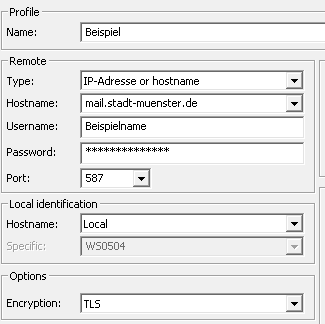
name@ads-ms.stadt-muenster.de
Wordpress
Migration
username@[~/Desktop]: mysql -u root -p databasename
Enter password:
Reading table information for completion of table and column names
You can turn off this feature to get a quicker startup with -A

Welcome to the MySQL monitor. Commands end with ; or g.
Your MySQL connection id is 892
Server version: 5.5.13 MySQL Community Server (GPL)

Copyright (c) 2000, 2010, Oracle and/or its affiliates. All rights reserved.

Oracle is a registered trademark of Oracle Corporation and/or its
affiliates. Other names may be trademarks of their respective
owners.

Type 'help;' or 'h' for help. Type 'c' to clear the current input statement.

mysql> UPDATE wp_options SET option_value = replace(option_value, 'http://www.oldurl', 'http://www.newurl') WHERE option_name = 'home' OR option_name = 'siteurl';
Query OK, 0 rows affected (0.00 sec)
Rows matched: 2 Changed: 0 Warnings: 0

mysql> UPDATE wp_posts SET guid = replace(guid, 'http://www.oldurl','http://www.newurl');
Query OK, 0 rows affected (0.02 sec)
Rows matched: 964 Changed: 0 Warnings: 0

mysql> UPDATE wp_posts SET post_content = replace(post_content, 'http://www.oldurl', 'http://www.newurl');
Query OK, 0 rows affected (0.05 sec)
Rows matched: 964 Changed: 0 Warnings: 0

mysql> UPDATE wp_postmeta SET meta_value = replace(meta_value,'http://www.oldurl','http://www.newurl');g
Query OK, 0 rows affected (0.01 sec)
Rows matched: 686 Changed: 0 Warnings: 0
Finally update your WordPress config file to reflect the new database, wp-config.php” which should be in your web document root – change, databasename, username, password and host values:
define('DB_NAME', 'databasename');

/** MySQL database username */
define('DB_USER', 'username');

/** MySQL database password */
define('DB_PASSWORD', 'password');

/** MySQL hostname */
define('DB_HOST', 'localhost');
Mysqlclient zugriff aus dem lokalen Netz:
GRANT ALL PRIVILEGES ON *.* TO 'root'@'192.168.%' IDENTIFIED BY '' WITH GRANT OPTION;Änderung in /etc/mysql/my.cnf :
[mysqld]
skip-networking=0
skip-bind-address
Canon
Formfaktor m.2
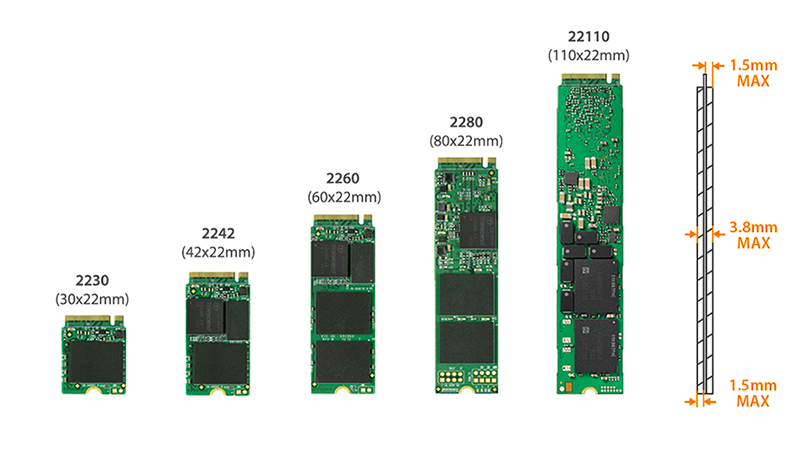
5320268_PDF_Datenblatt_minipcie-nvme.pdf
SSD Total Bytes Written (TBW) Calculator
Solid-State-Drives are getting more and more common. A problem that comes with SSDs is their limited cell lifetime. Depending on their manufacturing technique, each cell can be overwritten from 1.000 times in consumer TLC SSDs to up to 100.000 times in enterprise SLC based SSDs.
The value to keep an eye on is the guaranteed TBW (Total Bytes Written or Terabytes Written) which is typically provided by the vendor in their specifications. This value describes how many Terabytes can be written to the device until the warranty expires. The TBW value can be readout with S.M.A.R.T. in the Total_LBAs_Written field. The value is in LBAs which has to be multiplied with the sector size:
On common Linux Systems you can determine "Total LBAs Written" and "Sector Size" with smartctl:
~# smartctl /dev/ada0 --all |grep "Sector Size"
Sector Size: 512 bytes logical/physical
~# smartctl /dev/ada0 --all | grep Total_LBAs_Written
241 Total_LBAs_Written 0x0032 099 099 000 Old_age Always - 25351376107
Smartctl is not available on ESXi hosts by default, but the Linux compatible precompiled versions should work with ESXi (use the latest x86_64 build). Just copy it to your ESXi host, make it executable and run it as explained here.
| </div> |
| </div> |
| <div class="header-menu-sidebar-overlay hfg-ov hfg-pe" onclick="if('undefined' !== typeof toggleAriaClick ) { toggleAriaClick() }"></div> |
| </div> |
| </header> |
| <style>.is-menu-sidebar .header-menu-sidebar { visibility: visible; }.is-menu-sidebar.menu_sidebar_slide_left .header-menu-sidebar { transform: translate3d(0, 0, 0); left: 0; }.is-menu-sidebar.menu_sidebar_slide_right .header-menu-sidebar { transform: translate3d(0, 0, 0); right: 0; }.is-menu-sidebar.menu_sidebar_pull_right .header-menu-sidebar, .is-menu-sidebar.menu_sidebar_pull_left .header-menu-sidebar { transform: translateX(0); }.is-menu-sidebar.menu_sidebar_dropdown .header-menu-sidebar { height: auto; }.is-menu-sidebar.menu_sidebar_dropdown .header-menu-sidebar-inner { max-height: 400px; padding: 20px 0; }.is-menu-sidebar.menu_sidebar_full_canvas .header-menu-sidebar { opacity: 1; }.header-menu-sidebar .menu-item-nav-search:not(.floating) { pointer-events: none; }.header-menu-sidebar .menu-item-nav-search .is-menu-sidebar { pointer-events: unset; }.nav-ul li:focus-within .wrap.active + .sub-menu { opacity: 1; visibility: visible; }.nav-ul li.neve-mega-menu:focus-within .wrap.active + .sub-menu { display: grid; }.nav-ul li > .wrap { display: flex; align-items: center; position: relative; padding: 0 4px; }.nav-ul:not(.menu-mobile):not(.neve-mega-menu) > li > .wrap > a { padding-top: 1px }</style><style>.header-menu-sidebar .nav-ul li .wrap { padding: 0 4px; }.header-menu-sidebar .nav-ul li .wrap a { flex-grow: 1; display: flex; }.header-menu-sidebar .nav-ul li .wrap a .dd-title { width: var(--wrapdropdownwidth); }.header-menu-sidebar .nav-ul li .wrap button { border: 0; z-index: 1; background: 0; }.header-menu-sidebar .nav-ul li:not([class*=block]):not(.menu-item-has-children) > .wrap > a { padding-right: calc(1em + (18px*2)); text-wrap: wrap; white-space: normal;}.header-menu-sidebar .nav-ul li.menu-item-has-children:not([class*=block]) > .wrap > a { margin-right: calc(-1em - (18px*2)); padding-right: 46px;}</style> |
| <main id="content" class="neve-main"> |
| <div class="container single-post-container"> |
| <div class="row"> |
| <article id="post-18796" |
| class="nv-single-post-wrap col post-18796 post type-post status-publish format-standard hentry category-virtualization tag-calculator tag-ssd"> |
| <div class="entry-header" ><div class="nv-title-meta-wrap"><h1 class="title entry-title">SSD Total Bytes Written (TBW) Calculator</h1><ul class="nv-meta-list"><li class="meta author vcard "><span class="author-name fn">by <a href="https://www.virten.net/author/admin/" title="Posts by Florian Grehl" rel="author">Florian Grehl</a></span></li><li class="meta date posted-on "><time class="entry-date published" datetime="2016-12-28T18:27:19+01:00" content="2016-12-28">December 28, 2016</time><time class="updated" datetime="2020-09-30T17:27:17+02:00">September 30, 2020</time></li><li class="meta comments last"><a href="https://www.virten.net/2016/12/ssd-total-bytes-written-calculator/#comments">19 Comments</a></li></ul></div></div><div class="nv-content-wrap entry-content"><p>Solid-State-Drives are getting more and more common. A problem that comes with SSDs is their limited cell lifetime. Depending on their manufacturing technique, each cell can be overwritten from 1.000 times in consumer TLC SSDs to up to 100.000 times in enterprise SLC based SSDs.</p> |
| <p>The value to keep an eye on is the guaranteed <strong>TBW</strong> (Total Bytes Written or Terabytes Written) which is typically provided by the vendor in their specifications. This value describes how many Terabytes can be written to the device until the warranty expires. The TBW value can be readout with S.M.A.R.T. in the <strong>Total_LBAs_Written</strong> field. The value is in LBAs which has to be multiplied with the sector size:<span id="more-18796"></span></p> |
| <style>@media (max-width:480px){#cp_calculatedfieldsf_pform_2{min-height:5253px;}}@media (max-width:768px){#cp_calculatedfieldsf_pform_2{min-height:797px;}}@media (max-width:1024px){#cp_calculatedfieldsf_pform_2{min-height:1391px;}}@media (min-width:1024px){#cp_calculatedfieldsf_pform_2{min-height:847px;}}</style><form name="cp_calculatedfieldsf_pform_2" id="cp_calculatedfieldsf_pform_2" action="https://www.virten.net/2016/12/ssd-total-bytes-written-calculator/" method="post" enctype="multipart/form-data" onsubmit="return fbuilderjQuery.fbuilder.doValidate(this);" class="cff-form no-prefetch cff-form-12" data-nonce="4d963cec2b"> |
| <input type="hidden" name="cp_calculatedfieldsf_pform_psequence" value="_2" /> |
| <input type="hidden" name="cp_calculatedfieldsf_id" value="12" /> |
| <input type="hidden" name="cp_ref_page" value="https://www.virten.net" /> |
| <pre style="display:none !important;"><script type="text/javascript">form_structure_2=[[{"form_identifier":"","name":"fieldname2","shortlabel":"","index":0,"ftype":"fnumber","userhelp":"","userhelpTooltip":false,"csslayout":"","title":"Total LBAs Written","predefined":"0","predefinedClick":false,"required":false,"size":"small","thousandSeparator":"","decimalSymbol":".","min":"","max":"","dformat":"digits","formats":["digits","number"],"fBuild":{},"parent":""},{"form_identifier":"","name":"fieldname4","shortlabel":"","index":1,"ftype":"fdropdown","userhelp":"","userhelpTooltip":false,"csslayout":"","title":"Sector Size","size":"small","required":false,"choiceSelected":"512 bytes - 512 bytes","showDep":false,"choices":["512 bytes","4096 bytes"],"choicesVal":["512","4096"],"choicesDep":[[],[]],"fBuild":{},"parent":""},{"form_identifier":"","name":"separator1","shortlabel":"","index":2,"ftype":"fSectionBreak","userhelp":"","userhelpTooltip":false,"csslayout":"","title":"The field below will show the calculated number of Total Bytes Written in MB, GB and TB.","fBuild":{},"parent":""},{"form_identifier":"","name":"fieldname1","shortlabel":"","index":3,"ftype":"fCalculated","userhelp":"","userhelpTooltip":false,"csslayout":"","title":"Total Bytes Written (MB)","predefined":"","required":false,"size":"small","toolbar":"default|mathematical","eq":"PREC((fieldname2*fieldname4)\/1024\/1024,0)","suffix":" MB","prefix":"","decimalsymbol":".","groupingsymbol":"","dependencies":[{"rule":"","complex":false,"fields":[""]}],"readonly":true,"hidefield":false,"fBuild":{},"parent":""},{"form_identifier":"","name":"fieldname5","shortlabel":"","index":4,"ftype":"fCalculated","userhelp":"","userhelpTooltip":false,"csslayout":"","title":"Total Bytes Written (GB)","predefined":"","required":false,"size":"small","toolbar":"default|mathematical","eq":"PREC((fieldname2*fieldname4)\/1024\/1024\/1024,0)","suffix":" GB","prefix":"","decimalsymbol":".","groupingsymbol":"","dependencies":[{"rule":"","complex":false,"fields":[""]}],"readonly":true,"hidefield":false,"fBuild":{},"parent":""},{"form_identifier":"","name":"fieldname6","shortlabel":"","index":5,"ftype":"fCalculated","userhelp":"","userhelpTooltip":false,"csslayout":"","title":"Total Bytes Written (TB)","predefined":"","required":false,"size":"small","toolbar":"default|mathematical","eq":"PREC((fieldname2*fieldname4)\/1024\/1024\/1024\/1024,2)","suffix":" TB","prefix":"","decimalsymbol":".","groupingsymbol":"","dependencies":[{"rule":"","complex":false,"fields":[""]}],"readonly":true,"hidefield":false,"fBuild":{},"parent":""},{"form_identifier":"","name":"fieldname7","shortlabel":"","index":6,"ftype":"fSectionBreak","userhelp":"","userhelpTooltip":false,"csslayout":"","title":"","fBuild":{},"parent":""}],{"0":{"title":"SSD Total Bytes Written Calculator","description":"Calculates total bytes written based on S.M.A.R.T Attribute 241\/Total_LBAs_Written","formlayout":"top_aligned","formtemplate":"","evalequations":1,"autocomplete":1},"formid":"cp_calculatedfieldsf_pform_2"}];</script></pre> |
| <div id="fbuilder"> |
| <div id="fbuilder_2"> |
| <div id="formheader_2"></div> |
| <div id="fieldlist_2"></div> |
| <div class="clearer"></div> |
| </div> |
| </div> |
| <div id="cp_subbtn_2" class="cp_subbtn" style="display:none;"></div><div class="clearer"></div> |
| <input type="hidden" id="_cpcff_public_nonce" name="_cpcff_public_nonce" value="a8de8ac18b" /><input type="hidden" name="_wp_http_referer" value="/2016/12/ssd-total-bytes-written-calculator/" /></form> |
| <p>On common Linux Systems you can determine "Total LBAs Written" and "Sector Size" with smartctl:</p> |
| <pre>~# smartctl /dev/ada0 --all |grep "Sector Size" |
| Sector Size: <span style="color: #ff0000;"><strong>512 bytes</strong></span> logical/physical |
| ~# smartctl /dev/ada0 --all | grep Total_LBAs_Written |
| 241 Total_LBAs_Written 0x0032 099 099 000 Old_age Always - <span style="color: #ff0000;"><strong>25351376107</strong></span></pre> |
| <p>Smartctl is not available on ESXi hosts by default, but the <a href="http://builds.smartmontools.org/">Linux compatible precompiled versions</a> should work with ESXi (use the latest x86_64 build). Just copy it to your ESXi host, make it executable and run it as explained <a href="http://www.virten.net/2016/05/determine-tbw-from-ssds-with-s-m-a-r-t-values-in-esxi-smartctl/">here</a>.</p> |
SSD Total Bytes Written (TBW) Calculator
Solid-State-Drives are getting more and more common. A problem that comes with SSDs is their limited cell lifetime. Depending on their manufacturing technique, each cell can be overwritten from 1.000 times in consumer TLC SSDs to up to 100.000 times in enterprise SLC based SSDs.
The value to keep an eye on is the guaranteed TBW (Total Bytes Written or Terabytes Written) which is typically provided by the vendor in their specifications. This value describes how many Terabytes can be written to the device until the warranty expires. The TBW value can be readout with S.M.A.R.T. in the Total_LBAs_Written field. The value is in LBAs which has to be multiplied with the sector size:
On common Linux Systems you can determine "Total LBAs Written" and "Sector Size" with smartctl:
~# smartctl /dev/ada0 --all |grep "Sector Size"
Sector Size: 512 bytes logical/physical
~# smartctl /dev/ada0 --all | grep Total_LBAs_Written
241 Total_LBAs_Written 0x0032 099 099 000 Old_age Always - 25351376107
Smartctl is not available on ESXi hosts by default, but the Linux compatible precompiled versions should work with ESXi (use the latest x86_64 build). Just copy it to your ESXi host, make it executable and run it as explained here.
What is Video Bandwidth ? 720p, 1080p, GB Transfer Explained
Internet capacity is robust, but now that we’re all working from home, there has been a massive increase in global internet consumption beyond its usual spike. In 2020, The European Union called on streaming services like YouTube and Netflix to scale back their offering to prevent broadband networks from crashing. This means offering videos in SD rather than HD to reduce global bandwidth consumption. Videos are by far the biggest consumer of bandwidth and as per the CISCO report, streaming three hours of video content generates more Internet traffic than whole household consumption. This is how important video bandwidth is.
Note: There is a difference between how video bandwidth consumption is represented in cloud-based architecture pricing and majorly followed generic Internet terminology. In this piece, we will focus on actual Bandwidth supported by generic Internet terminology and discuss the video-hosting bandwidth calculations in the last.
- What is Video Bandwidth & its composition
- Video Bandwidth Vs Internet Speed
- Bandwidth Vs Latency
- Bandwidth Vs Throughput
- How much bandwidth does streaming use?
- Minimum Bandwidth required for HD, FHD and UHD video streaming
- Data Usage required for HD (720p), FHD (1080p) and UHD (2160p) video streaming
- 1080p Streaming required Bandwidth & Internet Speed
- 4K and 8K Streaming Bandwidth requirement / Internet Speed
- Netflix & YouTube Video Bandwidth requirements
- Ideal Internet speed & Bandwidth required for Live Streaming
- Recommended bandwidth for Gaming and Online usage
- Calculation of Video Bandwidth & pricing via Video Hosting Provider
- Green Streaming: How to Reduce Video Bandwidth for Sustainability
- FAQs
In 2017, videos accounted for two-thirds of global consumer internet traffic and continuing since then. The effect of videos on bandwidth is more pronounced because of Ultra-High-Definition (UHD), or 4K, video streaming. The bit rate for a 4K video is about 15 to 18 Mbps, more than double the HD video bitrate and nine times more than the SD video bit rate.
What is Video Bandwidth & its composition
In the context of video streaming, the amount of information or data per unit of time that a transmission medium like an internet connection can handle is Video Bandwidth. In simple words, Bandwidth is the maximum data-carrying capacity of a transmission medium and measured in bits per second(bps), Megabits per second(Mbps) or Gigabits per second(Gbps). So, for example, if the bandwidth is 50 Mbps, a maximum of 50 Mb data can be transferred per second on the channel.
High bandwidth capabilities mean you will be able to achieve higher data transfer speed, download and upload files faster and stream HD content. In addition, having a higher bandwidth has several advantages like allowing more simultaneous visitors to your website, faster application performance and support for multiple concurrent sessions.
Bandwidth capabilities largely depend on the plans and provider you have and how you access the Internet. Also, video bandwidth requirement varies with the type of activity undertaken. For example, uploading small text files and sending emails requires low bandwidth, while streaming HD video needs a bit more to run smoothly. Nevertheless, certain metrics are essential in understanding the importance of video bandwidth.
Important Metrics related to Bandwidth
Bitrate – It is the amount of data transmitted over a network during a given period of time. If the bandwidth is 50 Mbps, but the bitrate is 20 Mbps, a maximum of 50 Mb data can be transferred, but the channel is transmitting only 20 Mb per second. Bitrate corresponds to the video quality and file size. Streaming at higher bitrates yields higher quality streams but at the same time consumes a large chunk of bandwidth.
Frame Rate – The frequency at which consecutive images are projected to give the illusion of motion in a video. High-speed streaming, especially sports, require shooting video at a higher frame rate. Video bandwidth and frame are directly related. The higher the frame rate, the more bandwidth consumption.
This achievement underscores our commitment to providing true to words secure video hosting solutions with dedicated support. Join the growing number of businesses trusting VdoCipher with their video needs.
Video Resolution – Video resolution is the measurement of a video’s width by height in pixels. The more pixels, the higher the video quality. High-resolution videos have large file sizes, which means they require more bandwidth.
Compression – Uncompressed videos take up a lot of space. An uncompressed HD video footage nearly takes up 10 GB of space per minute of video and maybe varied with the frame rate. Video compression converts large raw video streams into smaller video files to reduce the size of the file. As a result, compressed videos require lower transmission bandwidth.
Video Bandwidth Vs Internet Speed
It’s very easy to get confused between Internet speed and bandwidth. The internet speed number, say, 5 Mbps your Internet Service Provider (ISP) gives, is not always related to how fast your Internet works. Bandwidth is the amount of data that can be download or uploaded from your computer, while Internet speed is how fast that data can be uploaded or downloaded. Many ISP’s allow different bandwidth limits for uploading and downloading. Usually, the upload bandwidth is lower than the download bandwidth.
There are often situations when your internet connection works too slow, even when you have higher bandwidth. Your internet speed could be less than or even match the bandwidth based on various factors. For instance, you have 30 Mbps broadband, but due to the incapacity of the router or copper lines, you usually get 20 Mbps. In addition, factors like infrastructure capacity, the number of subscribers connected to the ISP, router, crappy DNS servers can slow down the ultimate throughput of the connection at your end.
Bandwidth Vs Latency
Latency is often referred to as ping rate or delays or buffering. Latency measures the amount of time between the moment a data packet is sent and the moment it gets received and processed. On the other hand, Bandwidth is the amount of information transmitted per second. Higher bandwidth connections have increased download speed, and hence latency becomes much more noticeable. For example, a file may only take 5 milliseconds to download, but latency may cause the user to wait for nearly 100 milliseconds to receive the first byte of the data from the download request. Bandwidth is a significant factor in both video and audio streaming. If the bandwidth remains low, driving down latency may not deliver improved performance. On the other hand, if the network suffers from high latency connections, no bandwidth will help in data transfer.
Bandwidth Vs Throughput
Throughput measures how much information or data actually gets delivered in a certain amount of time, taking latency, packet loss, jitter, network speed and other factors into account. So, bandwidth is the maximum data transfer capacity of a network, and throughput is how much data makes it to its destination successfully. To have high-performance of the network, data packets must reach their destination successfully. Otherwise, there will be service delays even with a substantial amount of bandwidth available.
Experience multi-DRM video security through VdoCipher with additional layers to make security full proof. We’ve dedicated years to mastering video security and DRM integrations, ensuring your content is safeguarded against piracy.
Video Max Download Speed vs Streaming Bandwidth
Many users assume that a fast internet connection guarantees smooth video streaming, but in reality, download speed and streaming bandwidth serve different purposes. Download speed measures how quickly you can transfer a file to your device, while streaming bandwidth refers to the steady data flow required for uninterrupted playback. Streaming requires a continuous bitrate to be maintained, whereas downloading benefits from burst speeds.
For example, a 1080p video may only need 5-8 Mbps for smooth streaming, but a download speed of 20-30 Mbps ensures quicker storage of that same file. Real-world performance is also affected by factors like Wi-Fi signal quality, the number of active devices, and network congestion.
| Video Quality | Streaming Bandwidth (Mbps) | Max Download Speed (Mbps) | Estimated Data per Hour |
| 480p (SD) | 1.1 – 2 | 3 | 0.7 GB |
| 720p (HD) | 2.5 – 4 | 5 | 1.35 GB |
| 1080p (FHD) | 4.5 – 8 | 10 | 2.25 GB |
| 4K (UHD) | 15 – 25 | 30 | 7 – 11 GB |
How much bandwidth does streaming use?
Streaming, gaming and other online activities on multiple devices simultaneously require more bandwidth to keep up. Therefore, the more bandwidth your internet provider delivers, the faster is the online experience. The FCC provides Mbps requirements based on digital activities, and the below table includes recommended bandwidth requirements for watching videos, video conferencing, gaming, and more.
| Activity | Minimum Download Speed (Mbps) |
| Watching Video | |
| Streaming Standard Definition Video | 3 – 4 |
| Streaming High Definition (HD) Video | 5 – 8 |
| Streaming Ultra HD 4K Video | 25 |
| Video Conferencing | |
| Standard Personal Video Call (e.g., Skype) | 1 |
| HD Personal Video Call (e.g., Skype) | 1.5 |
| HD Video Teleconferencing | 6 |
| Gaming | |
| Game Console Connecting to the Internet | 3 |
| Online Multiplayer | 4 |
Minimum Bandwidth required for HD, FHD (Full HD) and UHD (Ultra HD) video streaming
| Resolutions | Required Bandwidth | Required Bandwidth |
| H264 | H265 | |
| 1280×720(HD) – 720p | 3Mbps | 1.5Mbps |
| 1920X1080(FHD) – 1080p | 6Mbps | 3Mbps |
| 3840×2160 (UHD) – 2160p/4K | 25Mbps | 12Mbps |
Data Usage required for HD (720p), FHD (1080p) and UHD (2160p) video streaming
The data usage required for HD, FHD (Full HD), and UHD (Ultra HD) video content streaming depends on various factors. It includes codec (e.g., H.264, H.265, VP9), bitrate, frame rate, and compression efficiency. However, the below figures are often cited for video streaming services.
| Resolutions | Typical Bitrate Range |
Data Usage at an average bitrate
|
| 1280×720(HD) – 720p | 2 Mbps to 4 Mbps |
1.35 GB/hr @ 3 Mbps
|
| 1920X1080(FHD) – 1080p | 4 Mbps to 8 Mbps |
2.25 GB/hr @ 5 Mbps
|
| 3840×2160 (UHD) – 2160p/4K | 15 Mbps to 68 Mbps |
11.25 GB/hr @ 25 Mbps
|
Note: The above figures can vary. For example, H.265 (HEVC) is more efficient than H.264. It can deliver similar video quality at about half the bitrate. Moreover, the actual bitrate can change dynamically based on your network conditions if you use adaptive bitrate streaming.
1080p Streaming required Bandwidth & Internet Speed
1080p streaming videos are at a display resolution of 1920X1080, and it offers full HD video content on the Internet. These videos have more clarity and resolution than an HD video at 720p. Also, 1080p video consumes more amounts of data compared to SD and HD streaming. As stated in the above table and with the H264 codec, the recommended bandwidth is 6 Mbps, and with the H265 codec, it usually requires up to 3 Mbps.
4K and 8K Streaming Bandwidth requirement / Internet Speed
4K videos with a display resolution of 4096p x 2160p offer the most life-like video content on the Internet. These high definition videos have more visual information than ever about the texture, colour, shapes than an HD video. Unfortunately, 4k consumes enormous amounts of data compared to SD, HD & FHD streaming. With the H264 codec, the recommended bandwidth is 32 Mbps, and with the H265 codec, it could be up to 15 Mbps. To stream 4K HDR content, one needs a 4K UHD TV with HEVC decoder and HDR support. You can read more about SD vs HD in this blog.
Complete control to personalize your online video player, catering to your brand and specific requirements. You can easily change the color, design, and player controls, including adaptive playback, video speed change, and multi-language subtitles.
Even with an 8K streaming service, most people wouldn’t be able to use it. Platforms like Netflix specifies a 25 Mbps stream for 4K content. This requirement seems to quadruple as there is no H.266 standard alongside 8K to reduce the file size. Netflix consumes 3.1GB/hour at 1080p for 60fps video and even 7GB/hour at 4K. If we assume that the transition from 4K to 8K consumes an equivalent amount of bandwidth to 1080p – 4K transition, the per hour bandwidth requirement to stream 8K content would be nearly 6.44GB – 19.2GB/hour for 23.976fps content. This is still a high bandwidth rate to burn out.
Netflix & YouTube Video Bandwidth requirements
The bandwidth required to stream Netflix depends on the video quality. The recommended download bandwidth for movies and TV shows on Netflix is 1.5 Mbps, 0.5 Mbps being the minimum threshold. 0.5 Mbps is just enough to start a video stream, but anything below 1.5 Mbps leads to poor video quality. As recommended by Netflix, Standard definition (SD) requires 3 Mbps, High definition (HD) 5 Mbps and 4K/Ultra HD at least 25 Mbps. You can set video quality settings to ‘Medium’ or ‘Low’ to manage Netflix bandwidth usage to use less data while streaming. According to real-world tests, in terms of per hour watching, Netflix’s actual bandwidth requirement at 1080p with 23.976fps video ranges from 1.9GB – 2.55GB and 3.5GB – 7GB for 4K.
While watching YouTube videos on smartphones, smart TV or laptop, the bandwidth requirement remains the same. The below table shows the approximate bandwidth required to play each video format without buffering or jitters.
| Video Resolution | Recommended Bandwidth |
| 4K | 20 Mbps |
| HD 1080p | 5 Mbps |
| HD 720p | 2.5 Mbps |
| SD 480p | 1.1 Mbps |
| SD 360p | 0.7 Mbps |
Ideal Internet speed & Bandwidth required for Live Streaming
The recommended internet speed for a 480p live streaming should be at least 3 Mbps. The minimum download bandwidth varies between streaming services. A higher bandwidth may be needed when multiple devices connect to the Internet at the same time. For example, to live stream 720p or 1080p, you will need at least 5 Mbps bandwidth. For seamless 4K streaming, the minimum limit is around 25 Mbps.
Recommended bandwidth for Gaming and Online usage
According to the Federal Communications Commission (FCC), gaming consoles connected to the Internet require a bandwidth of 3 Mbps. At the same time, online multiplayer games, like Call of Duty, need a bandwidth of 4 Mbps. However, as online games are evolving rapidly, FCC looks a little behind the times. Although the best gaming sessions, on average, require 3 Mbps of bandwidth speed, this varies with the number of players involved in each session. Gaming on a PC or MAC involves a minimum of 3 Mbps download speed and 1 Mbps to upload. The Xbox Series X quotes 10 Mbps as the preferred bandwidth.
Green Streaming: How to Reduce Video Bandwidth for Sustainability
Video streaming is a major contributor to global internet traffic, but few realize its environmental impact. According to a 2023 Shift Project report, streaming accounts for 60% of global internet traffic and contributes to about 1% of global carbon emissions, a number equivalent to the entire aviation industry.
- One hour of video streaming in HD produces up to 441g of CO₂, equivalent to driving a car for 2.5 miles (4 km).
- Streaming in 4K consumes three to four times more bandwidth than HD, significantly increasing energy usage.
- Live streaming, video conferencing, and cloud gaming further amplify bandwidth demand, leading to increased energy consumption by data centers.
- As demand for higher-resolution content (4K, 8K, VR, Metaverse streaming) grows, so does the need for sustainable bandwidth optimization.
How Streaming Platforms Are Reducing Bandwidth for Sustainability
1. Optimized Video Compression & AI-Based Encoding
One of the most effective ways to reduce bandwidth without compromising quality is through advanced video codecs and AI-powered encoding.
Next-Generation Codecs
- AV1 Codec (Developed by Alliance for Open Media) reduces bandwidth usage by 30-50% compared to H.264.
- H.266/VVC (Versatile Video Coding) provides 50% better compression than H.265, significantly cutting down data transfer needs.
- Netflix and YouTube have already implemented AV1 encoding on their platforms to lower bandwidth consumption.
AI-Based Encoding
- Streaming giants like Netflix, Amazon Prime, and YouTube use AI-powered dynamic encoding, which optimizes bitrates dynamically based on network conditions. It reduces redundant data transmission for repeated frames.
- Netflix’s AI-powered “Per-Title Encoding” can save up to 20% of bandwidth while maintaining video quality.
2. Adaptive Bitrate Streaming (ABR) for Bandwidth Efficiency
- ABR dynamically adjusts video quality based on network speed and device capability, ensuring the best experience while conserving bandwidth.
- Saves up to 40% of data usage by automatically switching between 1080p, 720p, and lower resolutions when necessary.
- Reduces strain on content delivery networks (CDNs), lowering energy consumption at global data centers.
- Major platforms like YouTube, Netflix, and Disney+ have integrated AI-driven ABR to optimize bandwidth usage.
During peak traffic in 2020, Netflix reduced bitrates by 25% in Europe to avoid overloading networks while keeping video quality high.
3. Green Data Centers for Sustainable Streaming
Streaming companies rely on massive server farms that consume huge amounts of electricity for video processing and content delivery. To combat this:
- Google, Amazon, and Microsoft have pledged to use 100% renewable energy for their data centers by 2030.
- Netflix and YouTube have moved workloads to carbon-neutral CDNs, reducing energy usage by up to 35%.
- AWS & Azure now offer low-energy GPU-based encoding, optimizing real-time streaming efficiency.
- Google Cloud uses AI-powered cooling to reduce energy consumption in its video streaming data centers by 40%.
4. Carbon-Aware Video Streaming: Adjusting Quality to Reduce Emissions
Tech companies are developing carbon-aware streaming algorithms that automatically reduce streaming resolution based on local energy grid emissions.
YouTube’s “Carbon-Aware Streaming Mode” lowers video quality when electricity demand is high, prioritizing sustainability over unnecessary HD streaming.
5. Efficient Video Delivery Through Edge Caching & CDNs
Traditional streaming fetches content from centralized data centers, which increases bandwidth usage. Edge caching & CDNs (Content Delivery Networks) help by:
- Storing video files closer to users to reduce unnecessary data transfers.
- Reducing bandwidth consumption by 50%, lowering carbon footprints.
- Enhancing streaming speeds while cutting energy demands.
Cloudflare and Akamai’s Green CDNs use solar-powered and AI-optimized caching to minimize power consumption.
How VdoCipher Supports Green Streaming & Bandwidth Optimization
- VdoCipher, a leading secure video hosting platform, actively reduces bandwidth usage through:
- Multi-DRM Encrypted Streaming – Ensures that videos are accessed only by authorized users, preventing wasted bandwidth from illegal downloads.
- Adaptive Bitrate Streaming – Automatically adjusts resolution, reducing data usage without affecting viewer experience.
- Server-Side Watermarking – Optimizes video overlays without additional processing, reducing bandwidth load.
VdoCipher’s custom HTML5 player delivers smooth playback while consuming 30-50% less bandwidth compared to other streaming providers.
Calculation of Video Bandwidth & pricing via Video Hosting Provider
Video Hosting providers take the bandwidth consumption on a data usage basis. E..g If a 1 GB video is played 10 times a day, then bandwidth consumed would be 1*10 = 10 GB.
With the application of user-based watermarks like IP address, user ID, email ID, and phone number, this feature not only blocks screen capture in many devices such as of Apple, but also discourages screen capture on websites.
At Vdocipher, different plans have different bandwidth options and the pricing for bandwidth can vary from $0.08/GB to $0.20/GB based on exact plan purchased. You can browse for more bandwidth plans on our pricing page and choose the plan as per your requirements. Also, if you are looking for an enterprise solution with bulk purchase, the bandwidth pricing can be further reduced.
FAQs:
How bitrate affects video quality?
A higher bitrate means a larger amount of video data bits uploaded per second. High bitrate increases video quality and file size. Conversely, lower bitrate results in smaller file size, low video quality and fast export time.
How to reduce bandwidth usage?
Malware scanning, use hosted filtering, limit VoIP use, identify bandwidth hogs, using proxy cache are some of the ways to limit bandwidth usage.
Does Netflix consume more bandwidth than YouTube?
Netflix uses around 1GB of data per hour for SD, up to 3GB for HD and about 7GB for 4K Ultra HD video. YouTube bandwidth usage is less compared to Netflix. A 480p SD video on average consumes 563MB of data per hour.
What are the ways to reduce latency?
Latency can be reduced by using a wired connection, network reboot, firewalls disabled. Check for faulty hardware and close unnecessary bandwidth-consuming applications.
How much bandwidth does 4K streaming use?
A 4K stream typically uses 15 to 25 Mbps, depending on codec and frame rate. Using H.265 or AV1 can reduce this to 10-15 Mbps with similar quality.
What is the required internet speed for 1080p video streaming?
For stable 1080p playback, you need at least 5 Mbps, but 8-10 Mbps is recommended for consistent performance, especially with adaptive streaming.
SSD-Speicherstandards
| Speichertyp | Bits pro Zelle | Schreibzyklen (P/E) | Typischer Anwendungsbereich | Vor- und Nachteile |
|---|---|---|---|---|
| MLC | 2 | ~ 10.000 | Ältere Hochleistungs-SSDs, Enterprise-Hardware | Sehr langlebig und schnell, aber teuer und mit geringerer Kapazität. |
| TLC | 3 | ~ 3.000 | Gaming, Alltag, Betriebssysteme, professionelle PCs | Bester Allrounder; ideal für häufiges Lesen/Schreiben. |
| QLC | 4 | ~ 1.000 | Datengräber, Massenspeicher, Archivierung | Sehr günstig und hohe Kapazitäten, aber langsamer bei großen Datentransfers. |