# Win3.11

Inatallationsanleitung für DOS-Box

# DosBox, Windows 3.11 & Games

Mitunter soll ältere Software nochmal zum Laufen gebracht werden. Gründe gibt es mindestens zwei: man will ältere Dokumente lesen und benötigt den entsprechenden Reader oder … „Just4Fun“ …man will nochmal ein altes Spiel von früher Spielen. Ich habe letzteres mit „Mamba“ probiert.

Benötigt wurde dafür Windows 3.11 und ich hatte ein Ubuntu 18.04.

Die Schritte in der Übersicht:

<div class="post__body" id="bkmrk-dosbox-installieren-">1. DosBox installieren
2. Laufwerk anlegen und einbinden
3. Windows 3.11 installieren
4. Mamba auf das Laufwerk auf und starten

</div>…und nun die Details…

#### DosBox installieren

Unter Ubuntu reicht hier ein `apt-get install dosbox`. Danach muss ein Ordner für evtl. Konfigurationen und das Laufwerk angelegt werden: `mkdir ~/.dosbox`.

#### Laufwerk anlegen und einbinden

Für das Laufwerk (c:) muss ein Unterverzeichnis in ~/.dosbox und ein Konfiguration (~/.dosbox/dosbox.conf bzw. ~/.dosbox/dosbox-VERSION.conf) angelegt werden:

`mkdir ~/.dosbox/drive_c`

Die Datei ~/.dosbox/dosbox.conf muss folgenden Inhalt haben:

```
[autoexec]
mount c ~/.dosbox/drive_c
```

#### Windows 3.11 installieren

Zunächst muss man sich die Windows 3.11-Disketten besorgen. Ich hatte 8 Disketten-Images. Diese habe ich einzeln gemounten und in einen Installationsordner kopiert:

```
mkdir ~/.dosbox/drive_c/install
for i in `seq 1 8`; do
  sudo mount -o loop Disk0$i.img /mnt
  cp /mnt/* ~/.dosbox/drive_c/install
  sudo umount /mnt
done
```

Nun „dosbox“ starten und dort ins Laufwerk „c:“ und in den Ordner „c:/install“ wechseln. Jetzt kann mit „setup.exe“ die Win3.11-Installation beginnen.

#### Mamba auf das Laufwerk auf und starten

Zum Schluss wird [Mamba](http://www.hans-brandt.de/Mamba/mamba.htm) in das Verzeichnis `~/.dosbox/drive_c` kopiert. Nun Windows hochfahren, den File Manager öffnen und Mamba starten.

<div class="post__body" id="bkmrk-windows-aus-dos-hera">- <figure>[![image.png](https://bst.wkmimnl.de/uploads/images/gallery/2025-05/scaled-1680-/0E3image.png)](https://bst.wkmimnl.de/uploads/images/gallery/2025-05/0E3image.png)
    
      
    <figcaption>Windows aus DOS heraus starten.</figcaption></figure>
- <figure>[![image.png](https://bst.wkmimnl.de/uploads/images/gallery/2025-05/scaled-1680-/NFhimage.png)](https://bst.wkmimnl.de/uploads/images/gallery/2025-05/NFhimage.png)
    
      
    <figcaption>File Manager öffnen</figcaption></figure>
- <figure>[![image.png](https://bst.wkmimnl.de/uploads/images/gallery/2025-05/scaled-1680-/bK1image.png)](https://bst.wkmimnl.de/uploads/images/gallery/2025-05/bK1image.png)
    
      
    <figcaption>Mamba spielen</figcaption></figure>

</div>Linkliste

<div class="post__body" id="bkmrk-https%3A%2F%2Fwww.dosbox.c">1. [https://www.dosbox.com/](https://www.dosbox.com/)
2. DosBox unter Ubuntu: [https://wiki.ubuntuusers.de/DOSBox/](https://wiki.ubuntuusers.de/DOSBox/)
3. Mounten via Loop Device: [https://de.wikipedia.org/wiki/Loop\_device](https://de.wikipedia.org/wiki/Loop_device)
4. [Windows 3.11 im Internet suchen](http://letmegooglethat.com/?q=windows+3.11+download)
5. [Mamba](http://www.hans-brandt.de/Mamba/mamba.htm)

</div><div class="meta" id="bkmrk-16.-april-2019%C2%A0%7C-ver">[16. April 2019](https://blogs.hu-berlin.de/rbgadmin/2019/04/16/dosbox-win3-11-games/ "Permalink zu DosBox, Windows 3.11 & Games") | Veröffentlicht von Robert Sombrutzki <div class="categories">Veröffentlicht unter [Allgemein](https://blogs.hu-berlin.de/rbgadmin/category/allgemein/)</div></div>

# Tutorial: Installing Windows 3.11 with (working) drivers! [Updated]

<div class="page-body" id="bkmrk-" role="main"><div class="action-bar bar-top"></div></div>[<span class="sr-only">Post</span>](https://forums.virtualbox.org/viewtopic.php?p=495900#p495900 "Post") <span class="responsive-hide">by **[Glijnos](https://forums.virtualbox.org/memberlist.php?mode=viewprofile&u=73614)** » </span><time datetime="2021-03-11T11:18:29+00:00">11. Mar 2021, 13:18</time>

<div class="page-body" id="bkmrk-%7Bmod-note%7Dthis-is-a-" role="main"><div class="post has-profile bg2" id="bkmrk-%7Bmod-note%7Dthis-is-a--1"><div class="inner"><div class="postbody"><div id="bkmrk-%7Bmod-note%7Dthis-is-a--2"><div class="content">*{mod note}This is a copy of a [tutorial created by user Glijnos back in 2012](https://forums.virtualbox.org/viewtopic.php?f=28&t=51190). Unfortunately Glijnos made a lot of use of IMG tags, which the forum now deprecates for security reasons (offsite images can be substituted with nasty stuff that we won't go into), hence his tutorial was ruined. Presented below is the same tutorial using local attachments, broken into multiple posts so that each post can remain below the forums three attachments limit*  
---------------------------------------------------------------------------------------------------------------------------------------------------------------------------------------  
Tutorial: Installing Windows For Workgroups 3.11 (Windows 3.11) on VirtualBox with full driver support.  
  
**Introduction**  
For this Tutorial VirtualBox has to be installed (correctly) on your computer.  
This tutorial was tested on the hosts Windows 7 SP1 and Linux (Ubuntu 11.04). But should probably work on other hosts as well.  
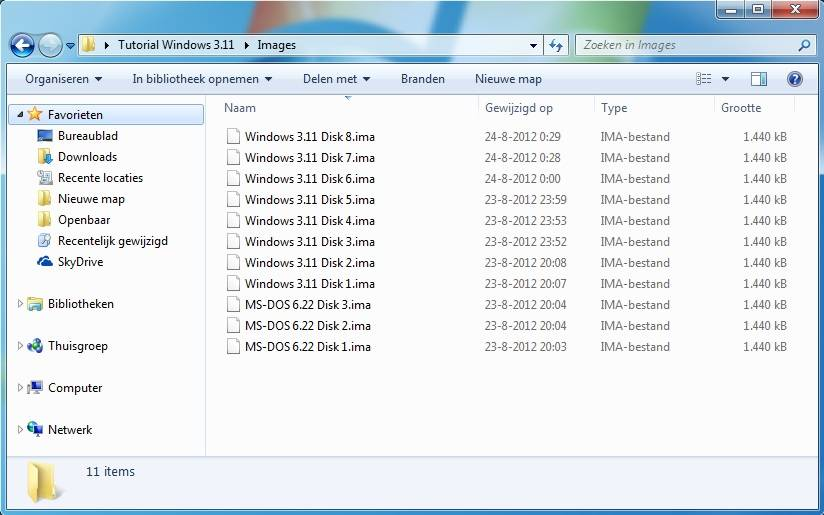
For this tutorial I used my 3.5-inch floppy disks of MS-DOS 6.22 and Windows 3.11. My present pc no longer has a floppy disk drive, so I used an old pc to create floppy images (.IMA) from my old floppy's.  
<div class="inline-attachment"><dl class="file"><dt class="attach-image">[![image.png](https://bst.wkmimnl.de/uploads/images/gallery/2025-05/scaled-1680-/SNjimage.png)](https://bst.wkmimnl.de/uploads/images/gallery/2025-05/SNjimage.png)

</dt><dd>floppyimages.jpg (55.78 KiB) Viewed 90277 times</dd></dl></div>Now that we have created the floppy images we can start to configure VirtualBox.  
Create a virtual machine  
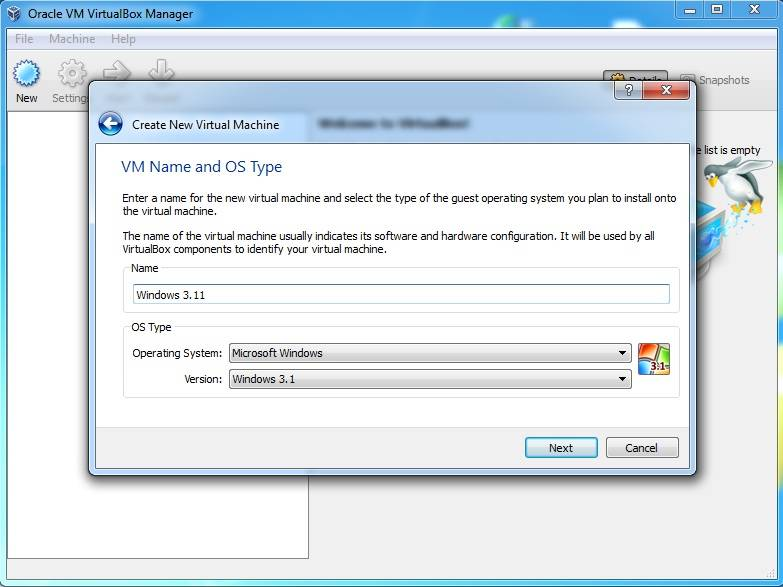
Create in VirtualBox a new virtual machine with the name Windows 3.11 or any name you like. By OS Type select the Operating System: Microsoft Window. Under version select: Windows 3.1.  
<div class="inline-attachment"><dl class="file"><dt class="attach-image">[![image.png](https://bst.wkmimnl.de/uploads/images/gallery/2025-05/scaled-1680-/qJSimage.png)](https://bst.wkmimnl.de/uploads/images/gallery/2025-05/qJSimage.png)

</dt><dd>vitualboxnewvm.jpg (50.34 KiB) Viewed 90277 times</dd></dl></div>Hit Next.  
By memory use the default Base memory size of 32 megabyte.  
Hit Next.  
Create a new hard disk.  
Hit Next.  
Use the default file type: VDI (Others may also work).  
Hit Next.  
By storage details use the option you like (I used Dynamically allocated)  
Hit Next.  
If you like, you can give the virtual disk another name or location.  
Use the default disk size of 1,00 Gigabyte (MS-DOS 6.22 can only recognise hard disks up to 2.1 GB)  
Hit Next, then two times Create to create the virtual machine.</div></div></div><div class="back2top">[<span class="sr-only">Top</span>](https://forums.virtualbox.org/viewtopic.php?t=102121#top "Top")</div></div></div><div class="post has-profile bg1"><div class="inner"><dl class="postprofile" id="bkmrk-glijnos-posts%3A%C2%A024-jo"><dt class="no-profile-rank no-avatar"><div class="avatar-container">  
</div>[Glijnos](https://forums.virtualbox.org/memberlist.php?mode=viewprofile&u=73614)</dt><dd class="profile-posts">**Posts:** [24](https://forums.virtualbox.org/search.php?author_id=73614&sr=posts)</dd><dd class="profile-joined">**Joined:** 22. Aug 2012, 22:28</dd></dl><div class="postbody"><div>  
</div></div></div></div></div>### [Adding a Floppy Controller](https://forums.virtualbox.org/viewtopic.php?p=495901#p495901)

[<span class="sr-only">Post</span>](https://forums.virtualbox.org/viewtopic.php?p=495901#p495901 "Post") <span class="responsive-hide">by **[Glijnos](https://forums.virtualbox.org/memberlist.php?mode=viewprofile&u=73614)** » </span><time datetime="2021-03-11T11:27:01+00:00">11. Mar 2021, 13:27</time>

<div class="page-body" id="bkmrk-before-you-start-the" role="main"><div class="post has-profile bg1" id="bkmrk-before-you-start-the-1"><div class="inner"><div class="postbody"><div id="bkmrk-before-you-start-the-2"><div class="content">Before you start the virtual machine you have to add a floppy controller.  
Right click on the new virtual machine, then Settings, under Storage click: Add floppy controller.  
<div class="inline-attachment"><dl class="file"><dt class="attach-image">[![image.png](https://bst.wkmimnl.de/uploads/images/gallery/2025-05/scaled-1680-/ijpimage.png)](https://bst.wkmimnl.de/uploads/images/gallery/2025-05/ijpimage.png)

</dt><dd>newvmcreatedfloppy.jpg (38.54 KiB) Viewed 90193 times</dd></dl></div>Add the newly added controller click on the green plus(+). A new window will popup, select: leave empty.  
<div class="inline-attachment"><dl class="file"><dt class="attach-image">[![image.png](https://bst.wkmimnl.de/uploads/images/gallery/2025-05/scaled-1680-/YKtimage.png)](https://bst.wkmimnl.de/uploads/images/gallery/2025-05/YKtimage.png)

</dt><dd>floppyleaveempty.jpg (44.12 KiB) Viewed 90193 times</dd></dl></div>Now that this is finished you can start the virtual machine.</div></div></div><div class="back2top">[<span class="sr-only">Top</span>](https://forums.virtualbox.org/viewtopic.php?t=102121#top "Top")</div></div></div><div class="post has-profile bg2"><div class="inner"><dl class="postprofile" id="bkmrk-glijnos-posts%3A%C2%A024-jo-1"><dt class="no-profile-rank no-avatar"><div class="avatar-container">  
</div>[Glijnos](https://forums.virtualbox.org/memberlist.php?mode=viewprofile&u=73614)</dt><dd class="profile-posts">**Posts:** [24](https://forums.virtualbox.org/search.php?author_id=73614&sr=posts)</dd><dd class="profile-joined">**Joined:** 22. Aug 2012, 22:28</dd></dl><div class="postbody"><div>  
</div></div></div></div></div>### [Selecting the MS-DOS Boot floppy](https://forums.virtualbox.org/viewtopic.php?p=495902#p495902)

[<span class="sr-only">Post</span>](https://forums.virtualbox.org/viewtopic.php?p=495902#p495902 "Post") <span class="responsive-hide">by **[Glijnos](https://forums.virtualbox.org/memberlist.php?mode=viewprofile&u=73614)** » </span><time datetime="2021-03-11T11:34:01+00:00">11. Mar 2021, 13:34</time>

<div class="page-body" id="bkmrk-ms-dos-is-needed-to-" role="main"><div class="post has-profile bg2" id="bkmrk-ms-dos-is-needed-to--1"><div class="inner"><div class="postbody"><div id="bkmrk-ms-dos-is-needed-to--2"><div class="content">MS-DOS is needed to run Windows 3.11. You can see Windows 3.11 as a graphical shell that depends on MS-DOS architecture.  
  
Now that your virtual machine is running you will get the following message:  
<div class="inline-attachment"><dl class="file"><dt class="attach-image">[![image.png](https://bst.wkmimnl.de/uploads/images/gallery/2025-05/scaled-1680-/7B0image.png)](https://bst.wkmimnl.de/uploads/images/gallery/2025-05/7B0image.png)

</dt><dd>vmrunninghalted.jpg (18.19 KiB) Viewed 90084 times</dd></dl></div>In the menu bar click on devices then --&gt; Floppy Devices --&gt; Choose a virtual floppy disk file... then select your first MS-DOS 6.22 setup floppy image file.  
<div class="inline-attachment"><dl class="file"><dt class="attach-image">[![image.png](https://bst.wkmimnl.de/uploads/images/gallery/2025-05/scaled-1680-/4mMimage.png)](https://bst.wkmimnl.de/uploads/images/gallery/2025-05/4mMimage.png)

</dt><dd>vmrunningselectmsdosflo.jpg (32.7 KiB) Viewed 90084 times</dd></dl></div>Hit Right Ctrl + R or use the menu bar --&gt; Machine --&gt; Reset to reboot the virtual machine.  
  
After the reboot VirtualBox loads the floppy Image and it will show the MS-DOS setup screen.  
<div class="inline-attachment"><dl class="file"><dt class="attach-image">[![image.png](https://bst.wkmimnl.de/uploads/images/gallery/2025-05/scaled-1680-/2WTimage.png)](https://bst.wkmimnl.de/uploads/images/gallery/2025-05/2WTimage.png)

</dt><dd>msdossetup.jpg (49.46 KiB) Viewed 90084 times</dd></dl></div></div></div></div><div class="back2top">[<span class="sr-only">Top</span>](https://forums.virtualbox.org/viewtopic.php?t=102121#top "Top")</div></div></div><div class="post has-profile bg1"><div class="inner"><dl class="postprofile" id="bkmrk-glijnos-posts%3A%C2%A024-jo-2"><dt class="no-profile-rank no-avatar"><div class="avatar-container">  
</div>[Glijnos](https://forums.virtualbox.org/memberlist.php?mode=viewprofile&u=73614)</dt><dd class="profile-posts">**Posts:** [24](https://forums.virtualbox.org/search.php?author_id=73614&sr=posts)</dd><dd class="profile-joined">**Joined:** 22. Aug 2012, 22:28</dd></dl><div class="postbody"><div>  
</div></div></div></div></div>### [Installing MS-DOS 6.22 (Format virtual hard disk)](https://forums.virtualbox.org/viewtopic.php?p=495904#p495904)

[<span class="sr-only">Post</span>](https://forums.virtualbox.org/viewtopic.php?p=495904#p495904 "Post") <span class="responsive-hide">by **[Glijnos](https://forums.virtualbox.org/memberlist.php?mode=viewprofile&u=73614)** » </span><time datetime="2021-03-11T11:40:49+00:00">11. Mar 2021, 13:40</time>

<div class="page-body" id="bkmrk-hit-enter-to-start-t" role="main"><div class="post has-profile bg1" id="bkmrk-hit-enter-to-start-t-1"><div class="inner"><div class="postbody"><div id="bkmrk-hit-enter-to-start-t-2"><div class="content">Hit Enter to start the setup.  
  
Next Choose: Configure Unallocated disk space.  
Next, hit Enter to reboot your virtual machine.  
After the reboot MS-DOS will format the virtual hard disk.  
<div class="inline-attachment"><dl class="file"><dt class="attach-image">[![image.png](https://bst.wkmimnl.de/uploads/images/gallery/2025-05/scaled-1680-/PYLimage.png)](https://bst.wkmimnl.de/uploads/images/gallery/2025-05/PYLimage.png)

</dt><dd>msdosformat.jpg (31.13 KiB) Viewed 90132 times</dd></dl></div>If the formatting hangs on 0%, then you have to reboot the virtual machine (right ctrl + R) and hit F8 until you see the following screen:  
<div class="inline-attachment"><dl class="file"><dt class="attach-image">[![image.png](https://bst.wkmimnl.de/uploads/images/gallery/2025-05/scaled-1680-/Qv2image.png)](https://bst.wkmimnl.de/uploads/images/gallery/2025-05/Qv2image.png)

</dt><dd>msdossetuphitf8screen.jpg (26.61 KiB) Viewed 90132 times</dd></dl></div>Refuse loading of AUTOEXEC.BAT  
When the A:\&gt; prompt will appears, give the command "format c:" and enter the command "setup" once formatting is done.  
<div class="inline-attachment"><dl class="file"><dt class="attach-image">[![image.png](https://bst.wkmimnl.de/uploads/images/gallery/2025-05/scaled-1680-/l2Fimage.png)](https://bst.wkmimnl.de/uploads/images/gallery/2025-05/l2Fimage.png)

</dt><dd>msdossetuphitf8screenfo.jpg (41.05 KiB) Viewed 90132 times</dd></dl></div>when the MS-DOS setup is running again you can follow the instructions on screen for installing MS-DOS.</div></div></div><div class="back2top">[<span class="sr-only">Top</span>](https://forums.virtualbox.org/viewtopic.php?t=102121#top "Top")</div></div></div><div class="post has-profile bg2"><div class="inner"><dl class="postprofile" id="bkmrk-glijnos-posts%3A%C2%A024-jo-3"><dt class="no-profile-rank no-avatar"><div class="avatar-container">  
</div>[Glijnos](https://forums.virtualbox.org/memberlist.php?mode=viewprofile&u=73614)</dt><dd class="profile-posts">**Posts:** [24](https://forums.virtualbox.org/search.php?author_id=73614&sr=posts)</dd><dd class="profile-joined">**Joined:** 22. Aug 2012, 22:28</dd></dl><div class="postbody"><div>  
</div></div></div></div></div>### [Installing MS-DOS 6.22 (Continued)](https://forums.virtualbox.org/viewtopic.php?p=495905#p495905)

[<span class="sr-only">Post</span>](https://forums.virtualbox.org/viewtopic.php?p=495905#p495905 "Post") <span class="responsive-hide">by **[Glijnos](https://forums.virtualbox.org/memberlist.php?mode=viewprofile&u=73614)** » </span><time datetime="2021-03-11T11:48:59+00:00">11. Mar 2021, 13:48</time>

<div class="page-body" id="bkmrk-when-the-ms-dos-setu" role="main"><div class="post has-profile bg2" id="bkmrk-when-the-ms-dos-setu-1"><div class="inner"><div class="postbody"><div id="bkmrk-when-the-ms-dos-setu-2"><div class="content">When the MS-DOS setup asks for Setup Disk #2, you have to load the next MS-DOS Floppy image.  
  
Click on devices in the menu bar again, then --&gt; Floppy Devices --&gt; Choose a virtual floppy disk file... then select your next MS-DOS 6.22 floppy image file.  
  
Use the same method for disk #3.  
<div class="inline-attachment"><dl class="file"><dt class="attach-image">[![image.png](https://bst.wkmimnl.de/uploads/images/gallery/2025-05/scaled-1680-/Geaimage.png)](https://bst.wkmimnl.de/uploads/images/gallery/2025-05/Geaimage.png)

</dt><dd>msdossetupnewdisk.jpg (43.79 KiB) Viewed 90132 times</dd></dl></div>When the setup is done, remove the floppy disk from the virtual drive, and press ENTER.  
<div class="inline-attachment"><dl class="file"><dt class="attach-image">[![image.png](https://bst.wkmimnl.de/uploads/images/gallery/2025-05/scaled-1680-/Sofimage.png)](https://bst.wkmimnl.de/uploads/images/gallery/2025-05/Sofimage.png)

</dt><dd>msdossetupfinishremoved.jpg (41.01 KiB) Viewed 90132 times</dd></dl></div>Setup complete:  
<div class="inline-attachment"><dl class="file"><dt class="attach-image">[![image.png](https://bst.wkmimnl.de/uploads/images/gallery/2025-05/scaled-1680-/mitimage.png)](https://bst.wkmimnl.de/uploads/images/gallery/2025-05/mitimage.png)

</dt><dd>msdossetupfinishfinal.jpg (33.21 KiB) Viewed 90132 times</dd></dl></div></div></div></div><div class="back2top">[<span class="sr-only">Top</span>](https://forums.virtualbox.org/viewtopic.php?t=102121#top "Top")</div></div></div><div class="post has-profile bg1"><div class="inner"><dl class="postprofile" id="bkmrk-glijnos-posts%3A%C2%A024-jo-4"><dt class="no-profile-rank no-avatar"><div class="avatar-container">  
</div>[Glijnos](https://forums.virtualbox.org/memberlist.php?mode=viewprofile&u=73614)</dt><dd class="profile-posts">**Posts:** [24](https://forums.virtualbox.org/search.php?author_id=73614&sr=posts)</dd><dd class="profile-joined">**Joined:** 22. Aug 2012, 22:28</dd></dl><div class="postbody"><div>  
</div></div></div></div></div>### [Installing MS-DOS 6.22 (Continued)](https://forums.virtualbox.org/viewtopic.php?p=495906#p495906)

[<span class="sr-only">Post</span>](https://forums.virtualbox.org/viewtopic.php?p=495906#p495906 "Post") <span class="responsive-hide">by **[Glijnos](https://forums.virtualbox.org/memberlist.php?mode=viewprofile&u=73614)** » </span><time datetime="2021-03-11T11:50:26+00:00">11. Mar 2021, 13:50</time>

<div class="page-body" id="bkmrk-after-the-reboot-the" role="main"><div class="post has-profile bg1" id="bkmrk-after-the-reboot-the-1"><div class="inner"><div class="postbody"><div id="bkmrk-after-the-reboot-the-2"><div class="content">After the reboot the MS-DOS 6.22 prompt will be loaded.</div><dl class="attachbox"><dt>Attachments</dt><dd><dl class="file"><dt class="attach-image">[![image.png](https://bst.wkmimnl.de/uploads/images/gallery/2025-05/scaled-1680-/a9Oimage.png)](https://bst.wkmimnl.de/uploads/images/gallery/2025-05/a9Oimage.png)

</dt><dd>dospromt.jpg (26.34 KiB) Viewed 90133 times</dd></dl></dd></dl></div></div><div class="back2top">[<span class="sr-only">Top</span>](https://forums.virtualbox.org/viewtopic.php?t=102121#top "Top")</div></div></div><div class="post has-profile bg2"><div class="inner"><dl class="postprofile" id="bkmrk-glijnos-posts%3A%C2%A024-jo-5"><dt class="no-profile-rank no-avatar"><div class="avatar-container">  
</div>[Glijnos](https://forums.virtualbox.org/memberlist.php?mode=viewprofile&u=73614)</dt><dd class="profile-posts">**Posts:** [24](https://forums.virtualbox.org/search.php?author_id=73614&sr=posts)</dd><dd class="profile-joined">**Joined:** 22. Aug 2012, 22:28</dd></dl><div class="postbody"><div>  
</div></div></div></div></div>### [Installing Windows 3.11](https://forums.virtualbox.org/viewtopic.php?p=495908#p495908)

[<span class="sr-only">Post</span>](https://forums.virtualbox.org/viewtopic.php?p=495908#p495908 "Post") <span class="responsive-hide">by **[Glijnos](https://forums.virtualbox.org/memberlist.php?mode=viewprofile&u=73614)** » </span><time datetime="2021-03-11T11:55:01+00:00">11. Mar 2021, 13:55</time>

<div class="page-body" id="bkmrk-now-that-ms-dos-is-i" role="main"><div class="post has-profile bg2" id="bkmrk-now-that-ms-dos-is-i-1"><div class="inner"><div class="postbody"><div id="bkmrk-now-that-ms-dos-is-i-2"><div class="content">Now that MS-DOS is installed we can start to run the Windows 3.11 setup.  
Click on devices in the menu bar again then --&gt; Floppy Devices --&gt; Choose a virtual floppy disk file... then select your first Windows 3.11 floppy image file.  
At the C:\&gt; prompt, give the command "A:\" and enter the command 'setup' once the prompt A:\&gt; will appear and hit enter.  
The Windows for Workgroups 3.11 setup screen will appear.  
<div class="inline-attachment"><dl class="file"><dt class="attach-image">[![image.png](https://bst.wkmimnl.de/uploads/images/gallery/2025-05/scaled-1680-/jkximage.png)](https://bst.wkmimnl.de/uploads/images/gallery/2025-05/jkximage.png)

</dt><dd>311setupscreen.jpg (36.69 KiB) Viewed 90133 times</dd></dl></div>  
Hit enter to setup Windows for Workgroups 3.11.  
On the next screen choose the Express Setup with the enter key (the express setup is usually fine).  
Windows will now be installed. When the setup asks for disk 2, click on devices in the menu bar again then --&gt; Floppy Devices --&gt; Choose a virtual floppy disk file... then select your next Windows 3.11 floppy image file.  
After that the setup will reboot to a more graphical style and ask for your name, company and product number (use your windows 3.11 product number )  
<div class="inline-attachment"><dl class="file"><dt class="attach-image">[![image.png](https://bst.wkmimnl.de/uploads/images/gallery/2025-05/scaled-1680-/XLbimage.png)](https://bst.wkmimnl.de/uploads/images/gallery/2025-05/XLbimage.png)

</dt><dd>311setupproductnumber.jpg (60.39 KiB) Viewed 90133 times</dd></dl></div>Click Continue.  
Verify your information and Click Continue.  
The setup will now continue. When it ask for the next disk, select your next Windows 3.11 floppy image and hit Enter.  
<div class="inline-attachment"><dl class="file"><dt class="attach-image">[![image.png](https://bst.wkmimnl.de/uploads/images/gallery/2025-05/scaled-1680-/yVuimage.png)](https://bst.wkmimnl.de/uploads/images/gallery/2025-05/yVuimage.png)

</dt><dd>311setupfloppydisk3.jpg (47.49 KiB) Viewed 90133 times</dd></dl></div>Repeat this action for the following floppy disks.</div></div></div><div class="back2top">[<span class="sr-only">Top</span>](https://forums.virtualbox.org/viewtopic.php?t=102121#top "Top")</div></div></div><div class="post has-profile bg1"><div class="inner"><dl class="postprofile" id="bkmrk-glijnos-posts%3A%C2%A024-jo-6"><dt class="no-profile-rank no-avatar"><div class="avatar-container">  
</div>[Glijnos](https://forums.virtualbox.org/memberlist.php?mode=viewprofile&u=73614)</dt><dd class="profile-posts">**Posts:** [24](https://forums.virtualbox.org/search.php?author_id=73614&sr=posts)</dd><dd class="profile-joined">**Joined:** 22. Aug 2012, 22:28</dd></dl><div class="postbody"><div>  
</div></div></div></div></div>### [Installing Windows 3.11 (Continued)](https://forums.virtualbox.org/viewtopic.php?p=495909#p495909)

[<span class="sr-only">Post</span>](https://forums.virtualbox.org/viewtopic.php?p=495909#p495909 "Post") <span class="responsive-hide">by **[Glijnos](https://forums.virtualbox.org/memberlist.php?mode=viewprofile&u=73614)** » </span><time datetime="2021-03-11T11:58:13+00:00">11. Mar 2021, 13:58</time>

<div class="page-body" id="bkmrk-when-it-asks-for-pri" role="main"><div class="post has-profile bg1" id="bkmrk-when-it-asks-for-pri-1"><div class="inner"><div class="postbody"><div id="bkmrk-when-it-asks-for-pri-2"><div class="content">When it asks for printer installation, just leave the "No Printer Attached" option selected and press the Install button.  
When it asks for Network Setup, just press continue (You have to configure this later).  
When it asks for the application name for C:\DOS\EDIT.COM, leave the default "MS-DOS Editor" option enabled and press OK.  
You can choose to either Run Tutorial or Skip Tutorial.  
Setup complete!  
Remove your last floppy Image and press Restart Computer.  
<div class="inline-attachment"><dl class="file"><dt class="attach-image">[![image.png](https://bst.wkmimnl.de/uploads/images/gallery/2025-05/scaled-1680-/vhUimage.png)](https://bst.wkmimnl.de/uploads/images/gallery/2025-05/vhUimage.png)

</dt><dd>311setupcomplete.jpg (49.87 KiB) Viewed 90133 times</dd></dl></div>After the reboot, you can type win into the MS-DOS command line to see your new, working Windows 3.11! It is fully usable at this point, but continue with the rest of this tutorial to enable network support, CD-ROM drivers, video drivers, sound drivers and Internet Explorer.  
<div class="inline-attachment"><dl class="file"><dt class="attach-image">[![image.png](https://bst.wkmimnl.de/uploads/images/gallery/2025-05/scaled-1680-/mNnimage.png)](https://bst.wkmimnl.de/uploads/images/gallery/2025-05/mNnimage.png)

</dt><dd>311windows.jpg (76.71 KiB) Viewed 90132 times</dd></dl></div></div></div></div><div class="back2top">[<span class="sr-only">Top</span>](https://forums.virtualbox.org/viewtopic.php?t=102121#top "Top")</div></div></div><div class="post has-profile bg2"><div class="inner"><dl class="postprofile" id="bkmrk-glijnos-posts%3A%C2%A024-jo-7"><dt class="no-profile-rank no-avatar"><div class="avatar-container">  
</div>[Glijnos](https://forums.virtualbox.org/memberlist.php?mode=viewprofile&u=73614)</dt><dd class="profile-posts">**Posts:** [24](https://forums.virtualbox.org/search.php?author_id=73614&sr=posts)</dd><dd class="profile-joined">**Joined:** 22. Aug 2012, 22:28</dd></dl><div class="postbody"><div>  
</div></div></div></div></div>### [Adding CD-ROM Support](https://forums.virtualbox.org/viewtopic.php?p=495910#p495910)

[<span class="sr-only">Post</span>](https://forums.virtualbox.org/viewtopic.php?p=495910#p495910 "Post") <span class="responsive-hide">by **[Glijnos](https://forums.virtualbox.org/memberlist.php?mode=viewprofile&u=73614)** » </span><time datetime="2021-03-11T12:08:11+00:00">11. Mar 2021, 14:08</time>

<div class="page-body" id="bkmrk-it-works-quicker-to-" role="main"><div class="post has-profile bg2" id="bkmrk-it-works-quicker-to--1"><div class="inner"><div class="postbody"><div id="bkmrk-it-works-quicker-to--2"><div class="content">It works quicker to load all drivers and setup files on a single CD-ROM disk image then on multiple floppy's images, so the first thing we need to do is to configure the ms-dos/Win 3.11 installation to recognise the VirtualBox (virtual) CD-ROM drive.  
Search the web for the file AOATAPI.SYS and Copy the AOATAPI.SYS file to a floppy disk image, or use the CD-ROM driver floppy Image that I already made for you.  
Start your virtual machine. Load the floppy Image, and then type COPY A:\AOATAPI.SYS C: at the command prompt to copy the AOATAPI.SYS file to your C: drive.  
After that you must edit your AUTOEXEC.BAT and CONFIG.SYS files.  
At the C:\ command prompt type EDIT AUTOEXEC.BAT. Place the line: c:\dos\mscdex.exe /d:idecd000 in the autoexec.bat and save, then exit (use the Alt key to activate the menu).  
<div class="inline-attachment"><dl class="file"><dt class="attach-image">[![image.png](https://bst.wkmimnl.de/uploads/images/gallery/2025-05/scaled-1680-/rP6image.png)](https://bst.wkmimnl.de/uploads/images/gallery/2025-05/rP6image.png)

</dt><dd>cdromeditautoexec.jpg (45.24 KiB) Viewed 90131 times</dd></dl></div>At the C:\ prompt type EDIT CONFIG.SYS. Place the line device=c:\aoatapi.sys /d:idecd000 in the config.sys and then save, then exit.  
<div class="inline-attachment"><dl class="file"><dt class="attach-image">[![image.png](https://bst.wkmimnl.de/uploads/images/gallery/2025-05/scaled-1680-/sioimage.png)](https://bst.wkmimnl.de/uploads/images/gallery/2025-05/sioimage.png)

</dt><dd>cdromeditconfig.jpg (45.65 KiB) Viewed 90131 times</dd></dl></div>Restart the virtual machine and go into windows. Open the File Manager and now you will see Drive D for the CD ROM.  
I loaded the VirtualBox Guest additions for testing.  
<div class="inline-attachment"><dl class="file"><dt class="attach-image">[![image.png](https://bst.wkmimnl.de/uploads/images/gallery/2025-05/scaled-1680-/Z9Vimage.png)](https://bst.wkmimnl.de/uploads/images/gallery/2025-05/Z9Vimage.png)

</dt><dd>cdromloaded.jpg (45.47 KiB) Viewed 90131 times</dd></dl></div></div></div></div><div class="back2top">[<span class="sr-only">Top</span>](https://forums.virtualbox.org/viewtopic.php?t=102121#top "Top")</div></div></div><div class="post has-profile bg1"><div class="inner"><dl class="postprofile" id="bkmrk-glijnos-posts%3A%C2%A024-jo-8"><dt class="no-profile-rank no-avatar"><div class="avatar-container">  
</div>[Glijnos](https://forums.virtualbox.org/memberlist.php?mode=viewprofile&u=73614)</dt><dd class="profile-posts">**Posts:** [24](https://forums.virtualbox.org/search.php?author_id=73614&sr=posts)</dd><dd class="profile-joined">**Joined:** 22. Aug 2012, 22:28</dd></dl><div class="postbody"><div>  
</div></div></div></div></div>### [Sound Card Installation](https://forums.virtualbox.org/viewtopic.php?p=495911#p495911)

[<span class="sr-only">Post</span>](https://forums.virtualbox.org/viewtopic.php?p=495911#p495911 "Post") <span class="responsive-hide">by **[Glijnos](https://forums.virtualbox.org/memberlist.php?mode=viewprofile&u=73614)** » </span><time datetime="2021-03-11T12:12:01+00:00">11. Mar 2021, 14:12</time>

<div class="page-body" id="bkmrk-search-the-web-for-t" role="main"><div class="post has-profile bg1" id="bkmrk-search-the-web-for-t-1"><div class="inner"><div class="postbody"><div id="bkmrk-search-the-web-for-t-2"><div class="content">Search the web for the Sound Blaster 16/AWE for DOS/Windows 3.1 drivers and Copy them to a CD-ROM disk image or floppy disk image, or use the CD-ROM disk image that I already made for you.  
Start-up MS-DOS to a C:\ prompt. Load the floppy or CD image, access the SoundBlaster 16 drivers on the A: or D: drive, then type install.  
Note: On my driver CDROM type CD sb16 at the command prompt and then install.  
<div class="inline-attachment"><dl class="file"><dt class="attach-image">[![image.png](https://bst.wkmimnl.de/uploads/images/gallery/2025-05/scaled-1680-/woKimage.png)](https://bst.wkmimnl.de/uploads/images/gallery/2025-05/woKimage.png)

</dt><dd>soundinstallcmd.jpg (32.32 KiB) Viewed 90243 times</dd></dl></div>Accept all of the defaults in the installation.  
<div class="inline-attachment"><dl class="file"><dt class="attach-image">[![image.png](https://bst.wkmimnl.de/uploads/images/gallery/2025-05/scaled-1680-/UDlimage.png)](https://bst.wkmimnl.de/uploads/images/gallery/2025-05/UDlimage.png)

</dt><dd>soundinstallsettings.jpg (45.51 KiB) Viewed 90243 times</dd></dl></div>When the installation is complete you can run windows with sound.  
When you run windows it will create a Audio Program Group automatically.  
<div class="inline-attachment"><dl class="file"><dt class="attach-image">[![image.png](https://bst.wkmimnl.de/uploads/images/gallery/2025-05/scaled-1680-/hknimage.png)](https://bst.wkmimnl.de/uploads/images/gallery/2025-05/hknimage.png)

</dt><dd>soundwindows311.jpg (38.2 KiB) Viewed 90243 times</dd></dl></div></div></div></div><div class="back2top">[<span class="sr-only">Top</span>](https://forums.virtualbox.org/viewtopic.php?t=102121#top "Top")</div></div></div><div class="post has-profile bg2"><div class="inner"><dl class="postprofile" id="bkmrk-glijnos-posts%3A%C2%A024-jo-9"><dt class="no-profile-rank no-avatar"><div class="avatar-container">  
</div>[Glijnos](https://forums.virtualbox.org/memberlist.php?mode=viewprofile&u=73614)</dt><dd class="profile-posts">**Posts:** [24](https://forums.virtualbox.org/search.php?author_id=73614&sr=posts)</dd><dd class="profile-joined">**Joined:** 22. Aug 2012, 22:28</dd></dl><div class="postbody"><div>  
</div></div></div></div></div>### [Network Installation](https://forums.virtualbox.org/viewtopic.php?p=495913#p495913)

[<span class="sr-only">Post</span>](https://forums.virtualbox.org/viewtopic.php?p=495913#p495913 "Post") <span class="responsive-hide">by **[Glijnos](https://forums.virtualbox.org/memberlist.php?mode=viewprofile&u=73614)** » </span><time datetime="2021-03-11T12:16:17+00:00">11. Mar 2021, 14:16</time>

<div class="page-body" id="bkmrk-search-the-web-for-t-3" role="main"><div class="post has-profile bg2" id="bkmrk-search-the-web-for-t-4"><div class="inner"><div class="postbody"><div id="bkmrk-search-the-web-for-t-5"><div class="content">Search the web for the "AMD PCNET Family (NDIS2/NDIS3)" driver and the " Microsoft TCP-IP-32 3.11b"drivers for Windows 3.11. Copy them to a CD-ROM disk Image or floppy disk Image, or use the CD-ROM disk Image that I already made for you.  
Boot into windows 3.11 and open the program group "Main". In "Main" open the program "Windows Setup", click "options" and then "Change Network Settings".  
<div class="inline-attachment"><dl class="file"><dt class="attach-image">[![image.png](https://bst.wkmimnl.de/uploads/images/gallery/2025-05/scaled-1680-/sdDimage.png)](https://bst.wkmimnl.de/uploads/images/gallery/2025-05/sdDimage.png)

</dt><dd>networksetup.jpg (60.12 KiB) Viewed 90132 times</dd></dl></div>On the "Network Setup" screen click on networks. On the next screen select "Install Microsoft Windows Network" and hit "OK".  
<div class="inline-attachment"><dl class="file"><dt class="attach-image">[![image.png](https://bst.wkmimnl.de/uploads/images/gallery/2025-05/scaled-1680-/EMzimage.png)](https://bst.wkmimnl.de/uploads/images/gallery/2025-05/EMzimage.png)

</dt><dd>networkinstallnetwork.jpg (65.24 KiB) Viewed 90132 times</dd></dl></div>Click "OK" again on the "Network Setup" screen.  
On the "Add Network Adapter" screen select the "Unlisted or Updated Network Adapter" option and click "OK".  
<div class="inline-attachment"><dl class="file"><dt class="attach-image">[![image.png](https://bst.wkmimnl.de/uploads/images/gallery/2025-05/scaled-1680-/iuqimage.png)](https://bst.wkmimnl.de/uploads/images/gallery/2025-05/iuqimage.png)

</dt><dd>networksetupunlisted.jpg (51.35 KiB) Viewed 90132 times</dd></dl></div></div></div></div><div class="back2top">[<span class="sr-only">Top</span>](https://forums.virtualbox.org/viewtopic.php?t=102121#top "Top")</div></div></div><div class="post has-profile bg1"><div class="inner"><dl class="postprofile" id="bkmrk-glijnos-posts%3A%C2%A024-jo-10"><dt class="no-profile-rank no-avatar"><div class="avatar-container">  
</div>[Glijnos](https://forums.virtualbox.org/memberlist.php?mode=viewprofile&u=73614)</dt><dd class="profile-posts">**Posts:** [24](https://forums.virtualbox.org/search.php?author_id=73614&sr=posts)</dd><dd class="profile-joined">**Joined:** 22. Aug 2012, 22:28</dd></dl><div class="postbody"><div>  
</div></div></div></div></div>### [Network Installation (Continued)](https://forums.virtualbox.org/viewtopic.php?p=495914#p495914)

[<span class="sr-only">Post</span>](https://forums.virtualbox.org/viewtopic.php?p=495914#p495914 "Post") <span class="responsive-hide">by **[Glijnos](https://forums.virtualbox.org/memberlist.php?mode=viewprofile&u=73614)** » </span><time datetime="2021-03-11T12:19:21+00:00">11. Mar 2021, 14:19</time>

<div class="page-body" id="bkmrk-on-the-cdrom-drive-o" role="main"><div class="post has-profile bg1" id="bkmrk-on-the-cdrom-drive-o-1"><div class="inner"><div class="postbody"><div id="bkmrk-on-the-cdrom-drive-o-2"><div class="content">On the CDROM drive or Floppy disk Image select the directory where you stored the " AMD PCNET Family " drivers --&gt; windowsnetdrv (windowsn) and click "OK".  
<div class="inline-attachment"><dl class="file"><dt class="attach-image">[![image.png](https://bst.wkmimnl.de/uploads/images/gallery/2025-05/scaled-1680-/KH0image.png)](https://bst.wkmimnl.de/uploads/images/gallery/2025-05/KH0image.png)

</dt><dd>networkdriverlocationse.jpg (61.76 KiB) Viewed 90132 times</dd></dl></div>And "OK" again, then select the "Advanced Micro Devices PCNET family" driver and click "OK" again.  
<div class="inline-attachment"><dl class="file"><dt class="attach-image">[![image.png](https://bst.wkmimnl.de/uploads/images/gallery/2025-05/scaled-1680-/UDRimage.png)](https://bst.wkmimnl.de/uploads/images/gallery/2025-05/UDRimage.png)

</dt><dd>networkdriveramdselect.jpg (51.05 KiB) Viewed 90132 times</dd></dl></div>Enter an User Name, Workgroup and Computer Name or keep the defaults and click "OK" again.  
<div class="inline-attachment"><dl class="file"><dt class="attach-image">[![image.png](https://bst.wkmimnl.de/uploads/images/gallery/2025-05/scaled-1680-/UVlimage.png)](https://bst.wkmimnl.de/uploads/images/gallery/2025-05/UVlimage.png)

</dt><dd>networkcomputername.jpg (42.49 KiB) Viewed 90132 times</dd></dl></div></div></div></div><div class="back2top">[<span class="sr-only">Top</span>](https://forums.virtualbox.org/viewtopic.php?t=102121#top "Top")</div></div></div><div class="post has-profile bg2"><div class="inner"><dl class="postprofile" id="bkmrk-glijnos-posts%3A%C2%A024-jo-11"><dt class="no-profile-rank no-avatar"><div class="avatar-container">  
</div>[Glijnos](https://forums.virtualbox.org/memberlist.php?mode=viewprofile&u=73614)</dt><dd class="profile-posts">**Posts:** [24](https://forums.virtualbox.org/search.php?author_id=73614&sr=posts)</dd><dd class="profile-joined">**Joined:** 22. Aug 2012, 22:28</dd></dl><div class="postbody"><div>  
</div></div></div></div></div>### [Network Installation (Continued)](https://forums.virtualbox.org/viewtopic.php?p=495915#p495915)

[<span class="sr-only">Post</span>](https://forums.virtualbox.org/viewtopic.php?p=495915#p495915 "Post") <span class="responsive-hide">by **[Glijnos](https://forums.virtualbox.org/memberlist.php?mode=viewprofile&u=73614)** » </span><time datetime="2021-03-11T12:22:22+00:00">11. Mar 2021, 14:22</time>

<div class="page-body" id="bkmrk-when-the-setup-asks-" role="main"><div class="post has-profile bg2" id="bkmrk-when-the-setup-asks--1"><div class="inner"><div class="postbody"><div id="bkmrk-when-the-setup-asks--2"><div class="content">When the setup asks for your Windows 3.11 Disk 7 and 8 floppy, load them and Click "OK".  
When the installation is complete click "OK" and then click "Restart Computer".  
Don't forget to remove your windows 3.11 installation floppy!  
<div class="inline-attachment"><dl class="file"><dt class="attach-image">[![image.png](https://bst.wkmimnl.de/uploads/images/gallery/2025-05/scaled-1680-/kv7image.png)](https://bst.wkmimnl.de/uploads/images/gallery/2025-05/kv7image.png)

</dt><dd>networksetupfinishmodif.jpg (50.58 KiB) Viewed 90086 times</dd></dl></div>When the reboot is complete start Windows Again. You get the messenger: welcome to Windows for Workgroups. Click "OK" to make a new password or "Cancel" the start the Program Manager.  
<div class="inline-attachment"><dl class="file"><dt class="attach-image">[![image.png](https://bst.wkmimnl.de/uploads/images/gallery/2025-05/scaled-1680-/PhXimage.png)](https://bst.wkmimnl.de/uploads/images/gallery/2025-05/PhXimage.png)

</dt><dd>welcomecq.jpg (31.09 KiB) Viewed 90086 times</dd></dl></div>Go to the program group "Network" and click "Network Setup". On the Network setup click on "Drivers", then "Add protocol" and select "Unlisted or Updated Protocol", then hit "ÖK".  
<div class="inline-attachment"><dl class="file"><dt class="attach-image">[![image.png](https://bst.wkmimnl.de/uploads/images/gallery/2025-05/scaled-1680-/T9Rimage.png)](https://bst.wkmimnl.de/uploads/images/gallery/2025-05/T9Rimage.png)

</dt><dd>networkprotocolsetup.jpg (59.64 KiB) Viewed 90086 times</dd></dl></div></div></div></div><div class="back2top">[<span class="sr-only">Top</span>](https://forums.virtualbox.org/viewtopic.php?t=102121#top "Top")</div></div></div><div class="post has-profile bg1"><div class="inner"><dl class="postprofile" id="bkmrk-glijnos-posts%3A%C2%A024-jo-12"><dt class="no-profile-rank no-avatar"><div class="avatar-container">  
</div>[Glijnos](https://forums.virtualbox.org/memberlist.php?mode=viewprofile&u=73614)</dt><dd class="profile-posts">**Posts:** [24](https://forums.virtualbox.org/search.php?author_id=73614&sr=posts)</dd><dd class="profile-joined">**Joined:** 22. Aug 2012, 22:28</dd></dl><div class="postbody"><div>  
</div></div></div></div></div>### [Network Installation (Continued)](https://forums.virtualbox.org/viewtopic.php?p=495916#p495916)

[<span class="sr-only">Post</span>](https://forums.virtualbox.org/viewtopic.php?p=495916#p495916 "Post") <span class="responsive-hide">by **[Glijnos](https://forums.virtualbox.org/memberlist.php?mode=viewprofile&u=73614)** » </span><time datetime="2021-03-11T12:24:10+00:00">11. Mar 2021, 14:24</time>

<div class="page-body" id="bkmrk-on-the-cdrom-drive-o-3" role="main"><div class="post has-profile bg1" id="bkmrk-on-the-cdrom-drive-o-4"><div class="inner"><div class="postbody"><div id="bkmrk-on-the-cdrom-drive-o-5"><div class="content">On the CDROM drive or Floppy disk Image select the directory where you stored the "Microsoft tcpip311b" drivers and click "OK".  
Select the Microsoft TCP/IP32 3.11b protocol and click "OK" again.  
<div class="inline-attachment"><dl class="file"><dt class="attach-image">[![image.png](https://bst.wkmimnl.de/uploads/images/gallery/2025-05/scaled-1680-/etZimage.png)](https://bst.wkmimnl.de/uploads/images/gallery/2025-05/etZimage.png)

</dt><dd>networkmicrosoftprotoco.jpg (53.93 KiB) Viewed 89827 times</dd></dl></div>When the installation is complete click "Close", after that click "OK".  
When the "Microsoft TCP/IP configuration" window pops up select "Enable Automatic DHCP configuration" or use your own configuration and hit "OK".  
<div class="inline-attachment"><dl class="file"><dt class="attach-image">[![image.png](https://bst.wkmimnl.de/uploads/images/gallery/2025-05/scaled-1680-/nOOimage.png)](https://bst.wkmimnl.de/uploads/images/gallery/2025-05/nOOimage.png)

</dt><dd>networkdhcp.jpg (53.92 KiB) Viewed 89827 times</dd></dl></div>Click on "Restart Computer" to finish the installation.  
To confirm that networking is working at this stage, try opening a MS-DOS Prompt from the "Main" group and type "ping [http://www.google.nl](http://www.google.nl/)".  
<div class="inline-attachment"><dl class="file"><dt class="attach-image">[![image.png](https://bst.wkmimnl.de/uploads/images/gallery/2025-05/scaled-1680-/jYvimage.png)](https://bst.wkmimnl.de/uploads/images/gallery/2025-05/jYvimage.png)

</dt><dd>networkping.jpg (54.55 KiB) Viewed 89827 times</dd></dl></div>If you get a reply, then your network installation is working correctly. Type exit to return to windows.</div></div></div><div class="back2top">[<span class="sr-only">Top</span>](https://forums.virtualbox.org/viewtopic.php?t=102121#top "Top")</div></div></div><div class="post has-profile bg2"><div class="inner"><dl class="postprofile" id="bkmrk-glijnos-posts%3A%C2%A024-jo-13"><dt class="no-profile-rank no-avatar"><div class="avatar-container">  
</div>[Glijnos](https://forums.virtualbox.org/memberlist.php?mode=viewprofile&u=73614)</dt><dd class="profile-posts">**Posts:** [24](https://forums.virtualbox.org/search.php?author_id=73614&sr=posts)</dd><dd class="profile-joined">**Joined:** 22. Aug 2012, 22:28</dd></dl><div class="postbody"><div>  
</div></div></div></div></div>### [Installing Internet Explorer 5.01](https://forums.virtualbox.org/viewtopic.php?p=495917#p495917)

[<span class="sr-only">Post</span>](https://forums.virtualbox.org/viewtopic.php?p=495917#p495917 "Post") <span class="responsive-hide">by **[Glijnos](https://forums.virtualbox.org/memberlist.php?mode=viewprofile&u=73614)** » </span><time datetime="2021-03-11T12:28:51+00:00">11. Mar 2021, 14:28</time>

<div class="page-body" id="bkmrk-to-browse-the-intern" role="main"><div class="post has-profile bg2" id="bkmrk-to-browse-the-intern-1"><div class="inner"><div class="postbody"><div id="bkmrk-to-browse-the-intern-2"><div class="content">To browse the internet you need to install a browser.  
Search the web for the "Internet Explorer 5 (windows 3.11)" and copy the installer to a CD-ROM disk Image. You can also use the CD-ROM disk image that I made for you.  
In windows open the File Manager, open your D:\ drive and run the msie501w311 installer.  
<div class="inline-attachment"><dl class="file"><dt class="attach-image">[![image.png](https://bst.wkmimnl.de/uploads/images/gallery/2025-05/scaled-1680-/bO9image.png)](https://bst.wkmimnl.de/uploads/images/gallery/2025-05/bO9image.png)

</dt><dd>ie5setupbrowse.jpg (45.28 KiB) Viewed 89869 times</dd></dl></div>WinZip will extract the installation files and start the setup.  
<div class="inline-attachment"><dl class="file"><dt class="attach-image">[![image.png](https://bst.wkmimnl.de/uploads/images/gallery/2025-05/scaled-1680-/sDGimage.png)](https://bst.wkmimnl.de/uploads/images/gallery/2025-05/sDGimage.png)

</dt><dd>ie5setup.jpg (58.7 KiB) Viewed 89869 times</dd></dl></div>Click "Next &gt;" and accept the agreement. Click "Next &gt;" again.  
Use the default Full install and click "Next &gt;".  
<div class="inline-attachment"><dl class="file"><dt class="attach-image">[![image.png](https://bst.wkmimnl.de/uploads/images/gallery/2025-05/scaled-1680-/fTpimage.png)](https://bst.wkmimnl.de/uploads/images/gallery/2025-05/fTpimage.png)

</dt><dd>ie5setupfullinstall.jpg (61.88 KiB) Viewed 89869 times</dd></dl></div></div></div></div><div class="back2top"><span class="button button-secondary dropdown-trigger dropdown-select dropdown-toggle" title="Topic tools"> </span></div></div></div></div><div class="page-footer" id="bkmrk--2" role="contentinfo"><div><div></div></div></div>